 |
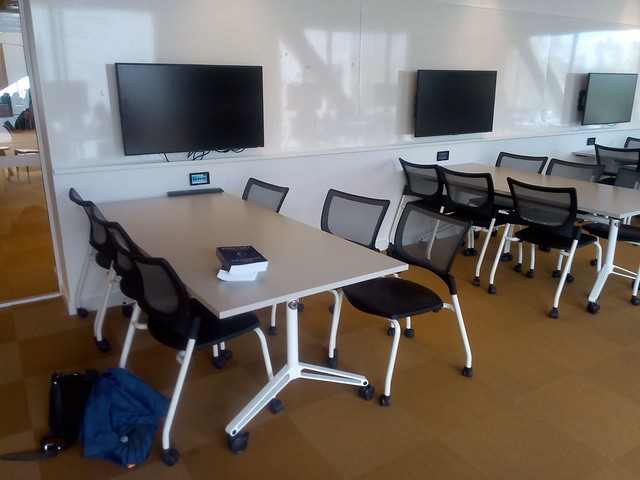
| Wall mounted LCD screens & desks on wheels at ANU Marie Reay Teaching Centre |
Showing posts with label STAR-L. Show all posts
Showing posts with label STAR-L. Show all posts
Saturday, October 19, 2019
Blending Soft Skills for University Graduates

Thursday, April 4, 2019
Audio Slideshow for Job Application Learning Module
This is the eighth of a series of posts , on how to provide students with help when preparing a reflective portfolio. This is specifically for students of ANU Tech Launcher.

Tuesday, March 12, 2019
How to Blend and Flip a Course for a Flatpack Classroom
In 2008 I ended my last lecture for the year at ANU by announcing it would be my last lecture, ever. Having become disillusioned with the lecture format, I have been teaching online for the last ten years, with an award winning course offered by three institutions, in Australia and North America. During that time I looked at alternative classroom designs in Australia and around the world.
In February 2019 the Australian National University unveiled the Marie Reay Teaching Centre, a flexible teaching building. So this year I am going back to the classroom, to apply what I have learned, with a blend of online and classroom teaching in the new building. This is intended to be a model for how academics can easily convert conventional courses to new interactive ways of learning, and allow each student to choose the blend of online and classroom learning to suit their needs.
Overview of the Learning Module
I produced slides, and a video for the revised learning module, on how to provide students with help when preparing a reflective portfolio. This is for students of ANU Tech Launcher, but intendeds to be able to be used more widely. The module has two parts, with the same format: read the notes, do an online quiz, participate in an on-line forum with peer assessment, then a face-to-face workshop, lastly do an assignment with peer feedback.
New Flexible Teaching Spaces at ANU
 |
| ANU Marie Reay Teaching Centre |
In contrast, the Marie Reay Teaching Centre has only flat floor classrooms, for 30, 60, or 120 students. The flexibility here is provided by retractable walls, furniture on wheels, and electronic screens on multiple walls.
 | ||
| 147 seat seminar room, ANU Sciences Teaching Building |
In contrast, the ANU Kambri complex has two buildings with specialized seating for specific pedagogy. The ANU Cultural Centre Building has high density tiered theater fixed seating for lectures. Opposite is the Marie Reay Teaching Centre with low density flat floor movable seating and tables for group work. This has the advantage that both format rooms can be used simultaneously. and offer a greater overall seating capacity, than would general purpose lecture/group rooms.
|
| Wall mounted LCD screens & desks on wheels at ANU Marie Reay Teaching Centre |
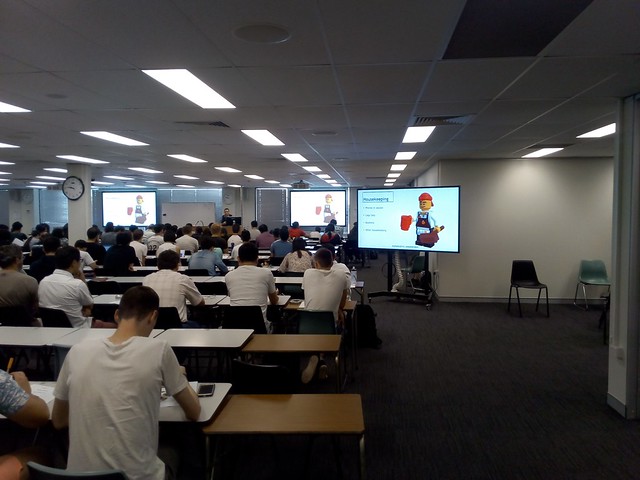 |
| Screen of Wheels, in use at the ANU Barry Drive classrooms, for ANU TechLauncher group activity |
Top Down Course Design
My approach to course design reflects the limited flexibility of the new buildings. Flexibility is provided, but not at the expense of efficiency.
The learning is designed top down: start with the learning objectives, or externally set requirements. These set, in broad terms, the knowledge and skills the student must have on completion of the course. Often these objectives are not provided to the educational designer, or are so vague they are of little use, so they have to be found, or invented.
The learning is designed top down: start with the learning objectives, or externally set requirements. These set, in broad terms, the knowledge and skills the student must have on completion of the course. Often these objectives are not provided to the educational designer, or are so vague they are of little use, so they have to be found, or invented.
For the Reflective Learning module, I first tried adapting skills definitions from the Skills
Framework for the Information Age:
"Upon completion of this module, students will be able to:
From the skill "Learning and Development" (ETMG), Level 6, SFIA, Version 7, 2017. As used in "Learning to Reflect" (Version 0.1), February 4, 2019.
- Determine their own learning needs and possible sources, to develop individual skills for a project and for their career development.
- Identify appropriate accreditation and qualification paths.
- Manage the learning, and evaluate its effectiveness through through reflection."
SFIA is used by the Australian Computer Society for accreditation of Australian university degrees, and by some employers in defining jobs. It is useful to have course objectives aligned with SFIA, to make accreditation quicker, and so graduates can easily show employers they have required skills.
However, as I writing a module for use in an existing course, and that course was not aligned with SFIA, this approach did not work. In a later draft I replaced the SFIA objectives, with ones from the course definition:
"The module is aligned with two of the outcomes for the course:
3. 'learn any specific technical skills required by their topic, and apply them to project work.4. apply and deepen skills in oral and written communication, and apply these in a project context.'From Computing Project, Course COMP8715, ANU, 2019. URL https://programsandcourses.anu.edu.au/course/comp8715" as cited in "Introduction", of Learning to Reflect, Version 1, February 13, 2019.
Aligning Assessment with Leaning
My usual approach is to continue the top down development, by providing one major assessment task for each learning objective. However, in this case the final assessment task was already set by the existing course the module. So I have to set other assessment around this.
The main issue the module was intended to address was the difficulty Masters of Computing students had with the large assessment task at the end of semester. The obvious solution was to break this assignment into pieces delivered in sequence. However, the same assessment task is undertaken by students in multiple courses, all of whom are in the same tutorial group with the same tutor. Having different versions of the assignment for different students would be confusing for tutors and students.
However, in late 2018 I could not be certain everything would be ready. So I used a conservative approach to blended course design, using what Fleck (2012) refers to as "chunky" blended learning:
Chunky Blended Learning
Designing learning takes time. I started designing the learning module in late 2018. At that time I was not sure if the new classrooms would be completed for first semester 2019. Even the week before semester started in February 2019, there was construction equipment around the building. However, this was quickly cleared away and the building opened on time, with the classroom equipped.However, in late 2018 I could not be certain everything would be ready. So I used a conservative approach to blended course design, using what Fleck (2012) refers to as "chunky" blended learning:
'The term "blended learning" usually refers to a mix of conventional face-to-face elements combined with on-line elements. However, this is at too general a level for in depth analysis, while the term "blend" perhaps suggests too homogeneous a mix: in practice the mix is more "lumpy", more a chunky fruit salad than a blended smoothie. At one extreme it is becoming routine for campus-based virtual learning environments (VLEs) to be used to provide additional notes and materials supporting conventional lectures.'
From Fleck (2012).The design is essentially a distance education course, with face-to-face workshops added. The learning management system (LMS), in this case Moodle (part of ANU's Wattle system) is used for providing students with course notes, videos, podcasts and other materials. The LMS is also used for routine announcements to the class, and individual communication with students. Small assessment tasks (quizzes and forum posts) are provided via Moodle's quiz and forum modules. Assignments are similarly done using the workshop module of Moodle.
As it was not clear what classroom would be available, the workshop design was kept general, and drawing on the preceding online activities.
This contrasts with tightly scripted online learning modules which give the student a few paragraphs to read and perhaps a video, then an automatically marked question they have to answer before proceeding to the next item. Such packages require considerable design and testing if they are not to hold up and frustrate students. Also these tend to require a high speed reliable network connection to function. In contrast the chunky approach allows students to download material, and use it offline.
The same format is used for all workshops, so that staff and students can become familiar with it. This avoids limited class time being taken up with explanations of complex exercise formats.
- Announcements: General announcements while students set up the room.
- General Questions: Students can ask for clarification on administrative, content and assessment questions. Groups first discuss the question and if they are not sure of the answer it can be put to the whole room.
- Forum Questions: Discuss your answers to this week's forum questions.
- Assignment Master Class: Bring along your draft assignment, ask for feedback from your group. Be prepared to put it up on the big screen for group feedback.
- Wrap-up: Any concluding remarks by students and instructors.
Chunky Online Learning
As well as the blended and online learning being chunky, the online component is in large chunks. The student is provided with a package of material for two weeks. This has notes, suggested readings, a quiz, discussion questions, workshop, and assignments. While the student is expected to undertake the work in this order, exactly what they do when in the two weeks is left largely to the individual.This contrasts with tightly scripted online learning modules which give the student a few paragraphs to read and perhaps a video, then an automatically marked question they have to answer before proceeding to the next item. Such packages require considerable design and testing if they are not to hold up and frustrate students. Also these tend to require a high speed reliable network connection to function. In contrast the chunky approach allows students to download material, and use it offline.
References
Fleck, J. (2012). Blended learning and learning communities: opportunities and challenges. Journal of Management Development, 31(4), 398-411. http://dx.doi.org.virtual.anu.edu.au/10.1108/02621711211219059
Worthington, T. My Last Lecture, Net Traveller (Blog), August 20, 2008.
URL https://blog.tomw.net.au/2008/08/my-last-lecture.html
Worthington, T., "A
Green computing professional education course online: Designing and
delivering a course in ICT sustainability using Internet and eBooks," Computer Science & Education (ICCSE), 2012 7th International Conference on , vol., no., pp.263,266, 14-17 July 2012 URL: http://dx.doi.org/10.1109/ICCSE.2012.6295070 Preprint available at: http://hdl.handle.net/1885/9013
Worthington, T. Learning to Teach in the New ANU Teaching Building, Higher Education Whisperer (Blog), February 11, 2019. URL https://blog.highereducationwhisperer.com/2019/02/learning-to-teach-in-new-anu-teaching.html
Worthington,
T. Helping Computing Students Prepare a Reflective Portfolio: Parts 1
to 7, Higher Education Whisperer (Blog), November 28, 2018 to February
13, 2019. URL https://blog.highereducationwhisperer.com/search/label/Reflective%20Portfolio%20Course
Wednesday, February 13, 2019
Shorter Learning Module for Teaching Students to a Write Job Application
Previously I provided three parts (1. Plan, 2. Learn, & 3. Report and reflect). However, that was far more work than a student could do in the available four hours study. So I have deleted part 1. Some of the content on learning has been moved to the next part "Learn", but the rest has been deleted. Also I have made all readings "suggested", not required. The SFIA learning objectives have been replaced with two from ANU Techlauncher (which the module is part of).
Also I have added a video with commentary to introduce the module, and audio podcasts for parts 1 & 2. The audio is text-to-speech, using Animaker's Australian English voice "Russell". I am not that good a speaker, and it would take a long of time to come up with a good narration. As it is, I can copy the notes to a text file. I then insert pauses at the ends of paragraphs, and replace abbreviations (such as "ANU", which would be pronounced as "Arrnoo"). I can simply edit the text and regenerate the audio, in a few minutes.
Table of contents
Introduction1. Learn
2. Report and reflect
Appendixes
Monday, February 4, 2019
Learning Module for Teaching Students to a Write Job Application
This is the sixth of a series of posts on how to provide students with
help when preparing a reflective portfolio. This is specifically for students of ANU Tech Launcher. Previously I looked at using the STAR approach for responding to selection criteria
(Cockburn, Carver, Shirley, & Davies, p. 71, 2007). Since then I have prepared the web page cor the module, quiz and forum questions, assignment rubrics and notes. Appended are the table of contents and introduction, from the notes.
One of the issues arising was how much the student would have to read, and do, in preparation for the actual assignment. The idea is that the exercises are integrated to preparing the assignments. The full notes for "Learning to Reflect" (Version 0.1) are available. Here is the introduction:
For each quiz students will answer three to five questions, with multiple choice and short answers. The quizzes will be automatically marked by the system. Questions will be randomly selected from a question bank, with ordering of multiple choice answers randomized.
For each forum students will be asked to answer two or three set questions with a few sentences (the questions are listed in the notes at the end of each part). Students are then asked to reply to the post by another student. Students will then give ratings for the answer (0, 1, or 2). The Instructor will provide a mark for each student, taking into account the student ratings.
For each assignment students will be given a question and a marking rubric. After submitting their own answer, for the first two assignments, students will rate three others using the rubric, and provide feedback. The instructor will review the student feedback, making any changes needed. The examiner will then allocate 90% of the grade for the student's work and 10% for their feedback. For the last assignment students are not required to rate or provide feedback.
An expanded STAR-L approach is used: Situation, Task, Action, Result, and lessons Learnt. (Cockburn, Carver, Shirley, and Davies (p. 71, 2007). ANU also provides samples of cover letters, selection criteria, and resumes for students.
Tina Cockburn; Tracey Carver; Melinda Shirley; Iyla Davies, Using E-Portfolio to Enable Equity Students toReflect on and Document Their Skill Development, 15 Waikato L. Rev. 64 (2007) URL https://heinonline.org/HOL/P?h=hein.journals/waik15&i=68
Tina Cockburn; Tracey Carver; Melinda Shirley; Iyla
Davies, Using E-Portfolio to Enable Equity Students toReflect on and Document Their Skill Development, 15
Waikato L. Rev. 64 (2007) URL https://heinonline.org/HOL/P?h=hein.journals/waik15&i=68
One of the issues arising was how much the student would have to read, and do, in preparation for the actual assignment. The idea is that the exercises are integrated to preparing the assignments. The full notes for "Learning to Reflect" (Version 0.1) are available. Here is the introduction:
Table of contents
Introduction
Overview
This module will enable students to develop capabilities expected of working professionals to identify their development needs, how they will acquire these and to reflect on what they have learned.Learning Outcomes
Upon completion of this module, students will be able to:- Determine their own
learning needs and possible sources, to develop individual skills for a project and for their career development.
- Identify
appropriate accreditation and qualification paths.
- Manage the learning, and evaluate its effectiveness through through reflection.
Indicative Assessment
Three online quizzes, 10% (5% per quiz, with best two counted). Contributions to three discussion forums, 20% (10% per forum, with best two out of three counted). Three assignments, 70% (35% each, best two out of three counted). Peer feedback from students in the forums, and on assignments, will be taken into account in grading by the examiners.For each quiz students will answer three to five questions, with multiple choice and short answers. The quizzes will be automatically marked by the system. Questions will be randomly selected from a question bank, with ordering of multiple choice answers randomized.
For each forum students will be asked to answer two or three set questions with a few sentences (the questions are listed in the notes at the end of each part). Students are then asked to reply to the post by another student. Students will then give ratings for the answer (0, 1, or 2). The Instructor will provide a mark for each student, taking into account the student ratings.
For each assignment students will be given a question and a marking rubric. After submitting their own answer, for the first two assignments, students will rate three others using the rubric, and provide feedback. The instructor will review the student feedback, making any changes needed. The examiner will then allocate 90% of the grade for the student's work and 10% for their feedback. For the last assignment students are not required to rate or provide feedback.
Overall mark calculation
Mark = best two quizzes + best two forums + best two assignments.Course specific policies
Late submission of assessment is not accepted.Workload
Twenty hours of student learning time, consisting of participation in online forums and assessment activities. A one hour face-to-face workshop will be provided to assist with each assignment (three hours in total).Prescribed Texts
An eBook is supplied with the course. In addition, from ANU Academic Skills: Reflective writing, reflective essays, learning journals. From ANU Careers:, cover letters, addressing selection criteria, resumes, and ANU Careers Guide (2018).An expanded STAR-L approach is used: Situation, Task, Action, Result, and lessons Learnt. (Cockburn, Carver, Shirley, and Davies (p. 71, 2007). ANU also provides samples of cover letters, selection criteria, and resumes for students.
Course schedule
The course consists of three parts, one topic per part, with one quiz, forum, and assignment, for each:- Plan the
learning needed. In this part the student investigates what they
need to learn for their project, and for long term career plans.
Assignment task is to produce a first draft of their CV, and
learning goals.
- Learn. The
student learns about different ways of learning, and identifies
appropriate accreditation and qualification paths for their future.
Assignment task is to address a typical set of selection criteria.
- Report and reflect. The student
reflects on what they have learned. Assignment task is to prepare an
application cover letter, and revise the other parts prepared
previously.
Communication platform
The ANU Wattle system is used for communication. Students and instructor will use Moodle Learning Management system tools:- Dialogue
for one-to-one communication.
- Forum
for group communication and discussion.
- Quiz
tool for quizzes.
- Workshop for assignments.
References
ANU Careers Guide: A practical guide to planning your career and maximising your employability, Version 7, ANU Careers (2018). URL http://www.anu.edu.au/files/resource/DSA173813%20Careers%20Guide%20v7%20WEB.pdf
Reference
Tina Cockburn; Tracey Carver; Melinda Shirley; Iyla
Davies, Using E-Portfolio to Enable Equity Students toReflect on and Document Their Skill Development, 15
Waikato L. Rev. 64 (2007) URL https://heinonline.org/HOL/P?h=hein.journals/waik15&i=68
Thursday, December 20, 2018
STAR-L for Teaching Students to Write Job Applications
This is the fifth of a series of posts on how to provide students with help when preparing a reflective portfolio. This is specifically for students of ANU Tech Launcher. Previously I looked at how to structure the learning. ANU's Student Experience and Career Development unit suggests using the STAR approach for responding to selection criteria. Cockburn, Carver, Shirley, and Davies (p. 71, 2007), discuss an expanded STAR-L approach used at Queensland University of Technology (QUT): Situation, Task, Action, Result, and lessons Learnt.
- "Situation - The situation is the context in which the experience occurred. ...
- Task - The task is what was actually required of you in the situation. ...
- Action - Action refers to the steps that you personally took in response to the task. ...
- Result - Result refers to the outcome of your actions. How did your actions contribute to the completion of the task? How did your actions affect the final outcome of the situation? ...
- Learnt - Learnt refers to the things you have learned from the experience. Highlight any skills or abilities that you have developed or improved as a result of the experience. ..."
From: Cockburn, Carver, Shirley, and Davies (p. 71, 2007)ANU provides samples of cover letters, selection criteria, and resumes for students.
Reference
Tina Cockburn; Tracey Carver; Melinda Shirley; Iyla
Davies, Using E-Portfolio to Enable Equity Students toReflect on and Document Their Skill Development, 15
Waikato L. Rev. 64 (2007) URL https://heinonline.org/HOL/P?h=hein.journals/waik15&i=68
Subscribe to:
Posts (Atom)