Showing posts with label reflection. Show all posts

Thursday, August 19, 2021

Learning to Reflect Module Version 5.0: Hybrid Edition


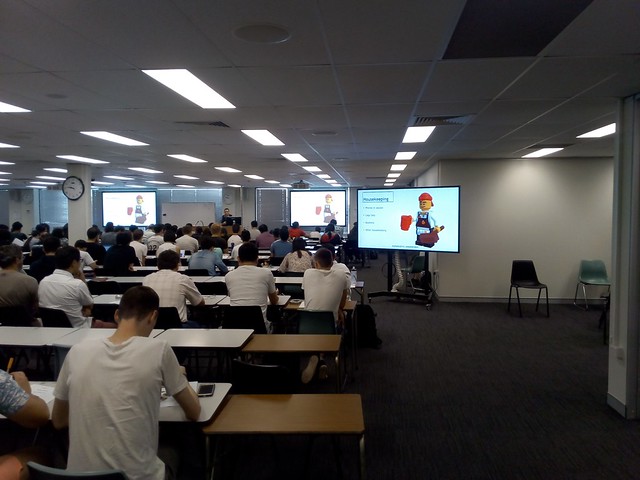
"Learning to Reflect" is a module for the ANU TechLauncher program, where students reflect on what they have learned, by writing an application for a real job, as their last assessed task before graduating. This was developed in late 2018 and first run in semester 1, February 2019. It was designed for blended delivery, with the option of easy conversion to full online delivery. That option was needed for Semesters 1 & 2 in 2020, and Semester 1 2021 due to COVID-19. This version 5 is designed for hybrid delivery, with students in a physical classroom linked to those online, using the MidFlex Minimal Hybrid FormatUnfortunately COVID-19 again required a return to pure online delivery, but without any changes required to the material.

Two additional workshops were added from Version 4, at student request, bringing the total to four. The first three have exercises for a 2% mark each (not for the last when a major assignment is due). The optional student logbook has been dropped due to lack of use. The middle two workshops are half the length of the others with the first hour used for the new ANU Computing Showcase, featuring prominent ANU alumni, speaking about their careers.

Please note that the course notes only supply the structure for the module and the assessment. The detailed content for the workshops is provided by Tempe Archer, Careers Consultant at ANU Careers, and the students undertake exercises using the ANU Careers Toolkit.

A paper on the design and blended delivery of the module is available:

Wednesday, February 24, 2021

Learning to Reflect Module Version 4.0 the 2021 Blended Edition


"Learning to Reflect" is a module for the ANU TechLauncher program, where students reflect on what they have learned, by writing an application for a real job, as their last assessed task before graduating. This was developed in late 2018 and first run in semester 1, from February 2019. This was designed for blended delivery, with the option of easy conversion to full online delivery. That option was needed for Semesters 1 and 2 in 2020 due to COVID-19. The 2021 version is intended to be run online, with a blended delivery option ready for a return to the classroom and is available under a CC-BY licence.

Two small workshop exercises have been added for a 2% mark each, in place of the quizzes and forums used previously. The first assignment has been dropped, to make the assessment less complex. An optional student logbook has been added, to aid student reflection and deter plagiarism. 

A paper on the design and blended delivery of the module is available:


Thursday, January 21, 2021

Moodle Wiki for a Student Logbook

I have been looking at which online tools could be used for students to create a logbook to Show-Your-Work. The Mahara Journal looked promising, especially as it is usually installed alongside Moodle. However, this would still be an additional tool students and staff would have to become familiar with. An alternative which looks promising is the Moodle Wiki. This can be set up so each student gets their own. I have created a logbook template which can be provided in the Wiki.

My template has a paragraph of explanatory text, then sections for the student to fill in. The student could create extra pages if they have a lot of content. But I expect one page will do for a typical student. They just click on "edit" the heading for a week, and put in some content. 

The fill in the blanks sentences are adapted from 
James (p.43, 2005). The topics for each week are from the Australian National University's Techlauncher program (Awasthy, Flint, and Sankaranarayana, 2017). Questions for the Work Portfolio (Weeks 4 and 8) were suggested by Tempe Archer, ANU Careers. The idea here is to provide a prompt for the student each week to start writing and avoid presenting then with a confronting blank page. The students are asked to write about the activity set for that week and a specific aspect of it.

Jacques, Ouahabi and Lequeu (2020) refer to the use of logbooks in Google Drive for French first year first year engineering students learning online,  but unfortunately give no more details. Kumar, Silva and Prelath, R. (2020) mention not having a project logbook as a problem for studio based learning in a Malaysian course, but again provide no more details. 

Reference

Awasthy, R., Flint, S., & Sankaranarayana, R. (2017, April). Lifting the constraints—Closing the skills gap with authentic student projects. In 2017 IEEE Global Engineering Education Conference (EDUCON) (pp. 955-960). IEEE. URL https://doi.org/10.1109/EDUCON.2017.7942964

James, Alisa, "Journaling as an Assessment Option" (2005). Kinesiology, Sport Studies and Physical Education Faculty Publications. 78.
https://digitalcommons.brockport.edu/pes_facpub/78

Jacques, S., Ouahabi, A., & Lequeu, T. (2020). Remote Knowledge Acquisition and Assessment During the COVID-19 Pandemic. International Journal of Engineering Pedagogy (iJEP)10. URL https://www.thierry-lequeu.fr/data/JACQUES-04.pdf

Kumar, J. A., Silva, P. A., & Prelath, R. (2020). Implementing studio-based learning for design education: a study on the perception and challenges of Malaysian undergraduates. International Journal of Technology and Design Education, 1-21. URL https://link.springer.com/content/pdf/10.1007/s10798-020-09566-1.pdf
Chicago

Logbook

You can use this logbook to keep notes, plans, and drafts of your work. This logbook is not assessed and is not visible to other students. However, it can be used as supporting evidence that the work you submitted for assessment was your own. All entries are logged and timestamped by the system, so the examiner will be able to see when you made notes and prepared drafts of your work.

Logbook

Your Name:

Student ID:

Week 1: Team Formation

Date:

Entry: The project is to ___ . My role is to ___.  

Week 2: Orientation

Date:

Entry: To successfully undertake my role I will need to learn to ___ . To do that I plan to ___.

Week 3: First Audit

Date:

Entry: The team managed to ___. To help with that I ___.

Week 4: First WPP Workshop

Date:

Entry: The key points from the WPP workshop were ___. The job I am considering is __ . So I will need to work on my ___ .

Week 5

Date:

Entry: One of the areas I need to work on with the teamwork is my ___ behavior. To address this I intend to ___ .

Week 6: Second Audit

Date:

Entry: The hardest part of the audit was ___ . This is because ___ .

Week 7

Date:

Entry: One of the skills I need to work on is ___ . To improve, outside the course I will ___ .

Week 8: Second Work Portfolio Workshop

Date:

Entry: Here is my unpacking of a job advertisement for the WPP workshop: ___

Week 9: Project Showcase Video

Date:

Entry: The main aspects to developing the video were to ___. My role was ___ . I found this ___.  

Week 10: Third Audit

Date

Entry: I was able to help the team with the audit by ___ . This could be useful in my career ___ . 

Week 11

Date:

Entry: The team uses different forms of communication for different purposes. This includes ___ to ___ and ___ to ___. It could be improved by ___ .

Week 12 Showcase and Work Portfolio

Date:

Entry: My WPP needs more ___ . 

Sunday, January 17, 2021

Non-reflective, Non-assessed Student Journals to Support Assessment?

Dr Alisa James
I have been looking at how to use tools such as Microsoft Word in Office 365, Mahara Journals, or Git for students to have STEM students Show-Your-Work. There has been much written about the use of reflective e-portfolios for assessment. I have been trained to write, teach and assess reflectively. However this is something the average STEM student and teacher finds very difficult. So I propose a form of non-reflective, non-assessed student journal: the student is prompted to record what they did.

James (2005) sets out how to guide physical educations students through preparing an assessed journal. They are referring to paper journals, but the technique applies also to electronic ones. First the student should be encouraged to be prepared with a suitable journal personalized to their tastes. With an e-journal I suggest a preliminary exercise where the student ensures they have access to the e-journal system, and enter some information about themselves. 

Ensuring students don't lose an e-journal is less of a problem than for the physical ones James discusses (p.42, 2005). An e-journal system used by an institution should obviously be protected from hacking and based up. However, it would nevertheless be useful to guide students through taking a copy of their journal, and reminding them not to edit old entries (as that then updates the time stamps ruining their value as evidence).

Writing prompts are more important for an e-journal used with an online course, than for the face to face classes James (2005) discusses. As the student will be mostly studying asynchronously, the teacher is not there and then saying "put a copy of that in your journal now". This has to be explicitly stated in course materials, ideally as part of a assessed task, so the student has an incentive. This can also be a good point. I suggest to mark a point in the course, an approach of synchronization of asynchronous learning (Worthington, 2013)

Writing prompt suggested by James (p.43, 2005) include: 

  1. "Write a paragraph about a ... goal you would like to reach. Explain why you want to reach that goal.
  2. Write a paragraph about what you did today that helped you to be successful in today's activities.
  3. Write a paragraph about your ... behavior for the day. What things might you do to demonstrate more sporting behavior in the future?
  4. What was the hardest thing for you to do today? Why was it hard?
  5. Write a paragraph that includes the cues of striking that we learned today. What will you do outside of school to practice these cues?
  6. Write a paragraph that includes the main aspects one should consider when developing a fitness program. Hint: Remember the FIT principle
  7. Write a paragraph that describes activities that you can do in your community that promote cardiovascular endurance .
  8. Write a paragraph that explains the difference between verbal and nonverbal communication. Why is it important to use both in cooperative activities? Be sure to give specific examples of both verbal and nonverbal communication." From James p.43, 2005, numbering added.

These are ordered from more to less reflective. The first four are about the individual student goals, success, behavior, difficulties. The next three are about future plans of the student to learn skills. The last is a more traditional study question about the course material. 

These questions are not that different to ones which might be asked as study aids in any course. One of my frustrations as a student was that my answers to such questions were never looked at by anyone, let alone count towards assessment. In theory they help with learning, but in practice, like any student, I would tend to focus on what got looked at and especially marked. The e-journal gets around this problem by having answers go somewhere, perhaps be looked at and help me at least pass the course.

James (p.44, 2005) points out It is important assess journals, but not overdo it.  entries. The author suggests the use of rubrics and checklists. However, they are unrealistic in expecting students to be frank in their entries. If the e-journal is part of the assessment, then students will write what they want the examiner to read.

For STEM students it can be especially difficult to find a comfortable voice to write about themselves. They may not understand the reason for writing this way and have had years of training which emphasized a neutral, impersonal way of writing. Also asking students to write for their e-journal is an extra task, as is assessing this. So I suggest a less personal approach, where the student places copies of what they are doing for their assigned tasks in their journal and  comments on these. In this way the student is commenting on the task and their work, not themselves.

This comment on the work, not yourself, is similar to the approach Dr Stephen Dann, has taken adapting the Lego Serious Play technique to reflection workshops. In 2017 Dr Dann ran a workshop for ANU staff working on their reflective e-portfolio for the Higher Education Academy Fellowship. In 2018 he ran a similar exercise for ANU Techlauncher students to consider their role in a group project. In each case the student is asked to make something with building blocks representing the topic and then talk about it. By talking about it, the students are encouraged to talk about themselves.

References

James, Alisa, "Journaling as an Assessment Option" (2005). Kinesiology, Sport Studies and Physical Education Faculty Publications. 78.
https://digitalcommons.brockport.edu/pes_facpub/78

Worthington, T. (2013). Synchronizing Asynchronous Learning: Combining Synchronous and Asynchronous Techniques. In Proceedings of 2013 8th International Conference on Computer Science & Education (ICCSE), 26 Apr - 28 Apr 2013 , Sri Lanka. URL: http://dx.doi.org/10.1109/ICCSE.2013.6553983 Preprint available at: http://hdl.handle.net/1885/9556


Saturday, December 26, 2020

Learning to Reflect Module Version 3.0 the 2020 COVID-19 Pandemic Edition

"Learning to Reflect" is a module for the ANU TechLauncher program developed in late 2018 and first run in semester 1, from February 2019. This was designed for blended delivery, with the option of easy conversion to full online delivery. That option was needed for Semester 1, February 2020 due to COVID-19,. The two face to face workshops were replaced with Zoom video conferences. The online content and activities were unchanged.

The assessment was removed from two online quizzes and forums, leaving just two assignments to provide 20% of Techlauncher assessment. This was done in an attempt to reduce the burden on students, and staff, who were suddenly required to change from face-to-face to online learning. The students still had their tutors at Zoom video-conferences, to help them keep up with their studies.

About 90% of students still completed the quizzes, despite them not counting towards assessment. In contrast, about 90% of students did not post regularly to the online forums. The difference may be because the quizzes were quick and easy to complete, being multiple choice, whereas the forum posts required composing text. Also the quizzes returned instant feedback in the form of connect/incorrect and a numeric score, whereas there was no automated feedback in the forums. When the forums are assessed, there is feedback from students (which is also assessed). However, some form of tutor-bot might be useful to give instant feedback.

A paper on the design and blended delivery of the module is available:

Worthington, T. (2019, December). Blend and Flip for Teaching Communication Skills to Final Year International Computer Science Students. In 2019 IEEE International Conference on Engineering, Technology and Education (TALE) (pp. 1-5). IEEE. https://doi.org/10.1109/TALE48000.2019.9225921

Monday, February 10, 2020

Reflecting on Reflecting on Learning

Learning to Reflect" blended module. This is the last assessed task for students undertaking the ANU Tech Launcher program before they graduate. Last semester the students read notes, watched videos, did an online quiz, participated in an on-line forum (with peer assessment), then a face-to-face workshop (run by Tempie Archer, from ANU Careers). They then submitted and assignment (with peer feedback), and repeated the process. That all worked well, but was seem by the students, and my colleagues, as too complex, and too much work. There was too much to read, too many assessment items, and too much peer assessment. Also the tutors, who the students have for face-to-face tutorials, felt excluded from the process.


Saturday, October 19, 2019

Blending Soft Skills for University Graduates

Wall mounted LCD screens and desks on wheels at ANU Marie Reay Teaching Centre
Wall mounted LCD screens
& desks on wheels at
ANU Marie Reay Teaching Centre
On 20 November I am speaking at the ANU TELFest technology-enhanced learning conference, on How to blend and flip a course for a flatpack classroom. This is for ANU staff, but I would be happy to speak on this elsewhere. In particular I will be in Sydney 28 to 29 October, and Perth on Wednesday 13 November, if anyone would like to provide a venue and an audience.

Wednesday, August 14, 2019

Learning to Reflect Module Version 2.0

I have updated my "Learning to Reflect" learning module for the ANU TechLauncher program this semester. The students are guided in how to prepare a job application. In the process they learn long term professional skills to identify their development needs, how they will acquire these and to reflect on what they have learned. The materials are available under a creative commons license for modification and reuse.

Introduction


The notes and videos contain content intended for instructors, as well as students, to be used in conjunction with online exercises, and face-to-face workshops. Students will be prompted by the Moodle Learning Management System, as to which parts to read, and when to read them.


1. Learn


In this first of two parts, you will investigate what you need to learn for your project, and long term for your career. In scope here, are both technical skills and also professional and teamwork skills. The aim is to prepare you to be a professional in your field, which includes the ability to take charge and responsibility for your future professional development.


2. Report and reflect


In this second and last part, you will reflect on what you have learned. The assignment task is to select a real position to prepare an application cover letter for, and revise the responses to selection criteria prepared in assignment 1.


Appendixes

Tuesday, August 6, 2019

Learning to Reflect Videos


Having revised the "Learning to Reflect" module notes for ANU TechLauncher students, it was time to revise the video. This is a time-consuming and exacting process, even for someone with training in video production.

Last semester I produced this by first making a slideshow presentation, which was also used live in the classroom. I prepared a script based on what was in the module notes, rearranged to match the sequence in the video. I then turned each slide into an image, and the script into synthetic speech. The slides and audio were then imported into a video editing package and timed to match the audio. The results were not perfect, but like Samuel Johnson's piano playing dog: "It's not done well; but you are surprised to find it done at all."  ;-)

This time I decided to try Content Samurai, after it was demonstrated at PitchEd NSW. This is a web based tool which takes a script, and searches for suitable video clips, or still images,  based on the key phrases. The service will then turn the script into synthetic speech timed to the video. This process works remarkably well. The Australian accented male voice provided is much better than those I have used previously. I did have to slow down the narration to 80% of full speed, and lower the volume of the background music to 5%.

After some experimentation I found I could set the system to add a new scene for each paragraph in the script. I could then hide the text, otherwise it would put it as a caption on screen. Also I could upload my slides in place of some of the auto suggested clips. This way my slides are interspersed with the suggested filler scenes.

Here is what the video looks like generated by automatically, with the defaults (video selected from keywords, scene transitions, animated text). This version was not usable:


I then changed the settings, to use only still images, and have one per paragraph, with no animation, or scene transitions:


One problem was that rendering was very slow (but video rendering is always slow). I found it could be faster by using still images, rather than video clips. The rendering took about six minutes for a six minute video. Also I created a plain black template for the slides, with no shaded pattern.

One option I would like is to reduce the bit-rate of the audio. For an educational video you need only low quality mono sound.

One tip is to set your slide maker (I use LibreOffice) for 16:9 format slides, to match a modern widescreen TV. Then generate the slides images at the resolution required. Full HD TV is 1,920x1,080. Content Samurai produced the lower resolution 1,280x720HD TV format typically used for broadcast TV, but down sampled my higher resolution slides very cleanly.

I could not find a way to prepare closed captions within Content Samurai, so I uploaded the video to YouTube, and then downloaded the VTT file it produced. I then uploaded this to the Moodle website, for the students.

Thursday, June 27, 2019

Learning to Reflect Course Module Worked


This is the tenth of a series of posts, on how to provide students with help when preparing a reflective portfolio. A class of 78 graduate computing students completed the module, as part of ANU Techlauncher. The flipped, blended, peer assessed approach worked well, and produced outcomes comparable to conventional lectures with instructor assessed assignments. A copy of the updated course notes are available. I can also provide a Moodle backup file including all course materials, and quiz questions, to instructors.

ANU Marie Reay
Teaching Centre
In 2008 I decided to stop using lectures as part of university courses. I then spent 2009 to 2018 designing and delivering purely online courses. In February 2019 the Australian National University unveiled the Marie Reay Teaching Centre, a flexible teaching building. I was able to use the building to try out the approach of an online course supplemented with face to face workshops. This I suggest could be generally applied in higher education. I have submitted a paper on this to an international computer education conference.

Friday, April 5, 2019

Audio Slideshow for Job Application Reflection Module


This is the ninth of a series of posts , on how to provide students with help when preparing a reflective portfolio. This is an audio slideshow. The slides are based on the course notes and the audio is computer generated.

This is intended to be a demonstration of how to produce multi-media for education, quickly, and easily. The slides were produced using LibreOffice "Impress" (a free alternative to Microsoft Powerpoint). To generate slides suitable for HDTV, the presentation was exported as PNG images at 1280×720 pixels. These slides were copied into the KDEinLive digital video package, and adjusted to fit with the audio commentary. The video was rendered as 720p MPEG 4,  at 200 kbps, 24 frames per second, with 64 kbps audio.

The computer generated audio is monotonous, and the text based slides not very interesting. However, this is a good start before trying anything more ambitious. Also students are not undertaking study to be entertained, but to be educated.

ps: This is for students of  ANU Tech Launcher.

Thursday, April 4, 2019

Audio Slideshow for Job Application Learning Module


This is the eighth of a series of posts , on how to provide students with help when preparing a reflective portfolio. This is specifically for students of  ANU Tech Launcher.


Mazen Al-Ismail
Previously I provided an audio podcast for part 1 "learn". However, research by Ismail (2018) suggests some students prefer audio with slides. So I have added slides to the audio. The student can still listen to the audio, without looking at the slides, which some prefer. This is easier to create and maintain than separate video and audio versions.

Tuesday, March 12, 2019

How to Blend and Flip a Course for a Flatpack Classroom

Next Friday, 15 March I will be speaking on "Blend, Flip, and Back to the Classroom". So I thought I should collect my thoughts on what to say. Here are some note, so far:

In 2008 I ended my last lecture for the year at ANU by announcing it would be my last lecture, ever. Having become disillusioned with the lecture format, I have been teaching online for the last ten years, with an award winning course offered by three institutions, in Australia and North America. During that time I looked at alternative classroom designs in Australia and around the world.

In February 2019 the Australian National University unveiled the Marie Reay Teaching Centre, a flexible teaching building. So this year I am going back to the classroom, to apply what I have learned, with a blend of online and classroom teaching in the new building. This is intended to be a model for how academics can easily convert conventional courses to new interactive ways of learning, and allow each student to choose the blend of online and classroom learning to suit their needs.

Overview of the Learning Module


I produced slides, and a video for the revised learning module, on how to provide students with help when preparing a reflective portfolio. This is for students of  ANU Tech Launcher, but intendeds to be able to be used more widely. The module has two parts, with the same format: read the notes, do an online quiz, participate in an on-line forum with peer assessment, then a face-to-face workshop, lastly do an assignment with peer feedback.

New Flexible Teaching Spaces at ANU

ANU Marie Reay Teaching Centre
The Marie Reay Teaching Centre opened at ANU 25 March, along with the Culture & events building opposite, both by Architects BVN. These buildings have flexible teaching spaces, but flexible in different ways. The culture and events building has a 500-seat auditorium, and a 200 seat flexible space. Both of these have tiered lecture theater style seating, but which retracts electrically, providing large flat floor spaces, with high ceilings.

In contrast, the Marie Reay Teaching Centre has only flat floor classrooms, for 30, 60, or 120 students. The flexibility here is provided by retractable walls, furniture on wheels, and electronic screens on multiple walls.

147 seat seminar room,
ANU Sciences Teaching Building


This approach of one building with lecture theaters, and one with flat floor classrooms, differs from attempts to combine the features of the two. As an example, the ANU Sciences Teaching Building has a 147 seat tiered seminar room. The room has wide tiers with fixed tables for groups of seven students. This is designed so students can watch a presentation at the front of the room, and then discuss it in a group, around their table. However, the tables take a lot of space and are fixed in place. Display screens on the tables block some of the view.

In contrast, the ANU Kambri complex has two buildings with specialized seating for specific pedagogy. The ANU Cultural Centre Building has high density tiered theater fixed seating for lectures. Opposite is the Marie Reay Teaching Centre with low density flat floor movable seating and tables for group work. This has the advantage that both format rooms can be used simultaneously. and offer a greater overall seating capacity, than would general purpose lecture/group rooms.
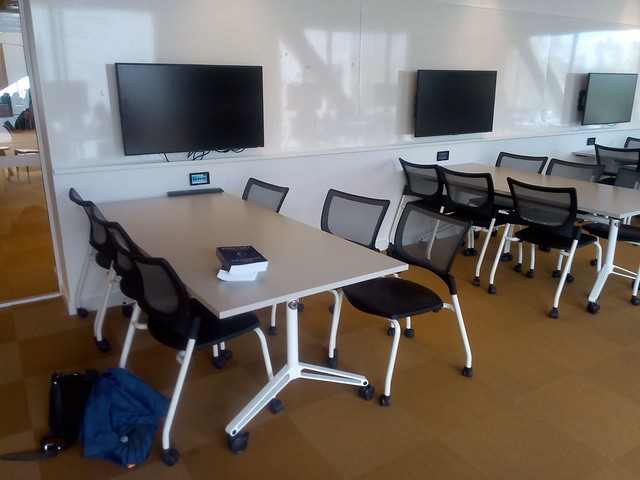
Wall mounted LCD screens and desks on wheels at ANU Marie Reay Teaching Centre
Wall mounted LCD screens
& desks on wheels at
ANU Marie Reay Teaching Centre
While the tables in the Marie Reay Teaching Centre are on wheels, one room (4.02) has five electronic screens on each side wall, spaced to allow each of five desks to have a screen (for a total of sixty students). This overcomes the problem of the desks becoming immovable, when computer screen are installed on them.

Students doing a Lego Serious Play exercise at the Australian National University in Canberra
Screen of Wheels, in use at the
ANU Barry Drive classrooms,
for ANU TechLauncher group activity
Other rooms have two projection screens for presentations. I have suggested these be supplemented with screens on wheels, which can be positioned for group work, or to display what is on the main screens. Such screens on wheels have been used at the ANU Barry Drive classrooms for an ANU TechLauncher group activity.

Top Down Course Design

My approach to course design reflects the limited flexibility of the new buildings. Flexibility is provided, but not at the expense of efficiency.

The learning is designed top down: start with the learning objectives, or externally set requirements. These set, in broad terms, the knowledge and skills the student must have on completion of the course.  Often these objectives are not provided to the educational designer, or are so vague they are of little use, so they have to be found, or invented.

For the Reflective Learning module, I first tried adapting skills definitions from the Skills Framework for the Information Age:
"Upon completion of this module, students will be able to:
  1. Determine their own learning needs and possible sources, to develop individual skills for a project and for their career development.
  2. Identify appropriate accreditation and qualification paths. 
  3. Manage the learning, and evaluate its effectiveness through through reflection."
 From the skill "Learning and Development" (ETMG), Level 6, SFIA, Version 7, 2017. As used in "Learning to Reflect" (Version 0.1), February 4, 2019.
SFIA is used by the Australian Computer Society for accreditation of Australian university degrees, and by some employers in defining jobs. It is useful to have course objectives aligned with SFIA, to make accreditation quicker, and so graduates can easily show employers they have required skills.

However, as I writing a module for use in an existing course, and that course was not aligned with SFIA, this approach did not work. In a later draft I replaced the SFIA objectives, with ones from the course definition:
"The module is aligned with two of the outcomes for the course:
3. 'learn any specific technical skills required by their topic, and apply them to project work.
4. apply and deepen skills in oral and written communication, and apply these in a project context.'
From Computing Project, Course COMP8715, ANU, 2019. URL https://programsandcourses.anu.edu.au/course/comp8715" as cited in "Introduction", of Learning to Reflect, Version 1, February 13, 2019.

Aligning Assessment with Leaning

My usual approach is to continue the top down development, by providing one major assessment task for each learning objective. However, in this case the final assessment task was already set by the existing course the module. So I have to set other assessment around this.
The main issue the module was intended to address was the difficulty Masters of Computing students had with the large assessment task at the end of semester. The obvious solution was to break this assignment into pieces delivered in sequence. However, the same assessment task is undertaken by students in multiple courses, all of whom are in the same tutorial group with the same tutor. Having different versions of the assignment for different students would be confusing for tutors and students.

Chunky Blended Learning

Designing learning takes time. I started designing the learning module in late 2018. At that time I was not sure if the new classrooms would be completed for first semester 2019. Even the week before semester started in February 2019, there was construction equipment around the building. However, this was quickly cleared away and the building opened on time, with the classroom equipped.

However, in late 2018 I could not be certain everything would be ready. So I used a conservative approach to blended course design, using what  Fleck (2012) refers to as "chunky" blended learning:
'The term "blended learning" usually refers to a mix of conventional face-to-face elements combined with on-line elements. However, this is at too general a level for in depth analysis, while the term "blend" perhaps suggests too homogeneous a mix: in practice the mix is more "lumpy", more a chunky fruit salad than a blended smoothie. At one extreme it is becoming routine for campus-based virtual learning environments (VLEs) to be used to provide additional notes and materials supporting conventional lectures.'
From Fleck (2012).
 The design is essentially a distance education course, with face-to-face workshops added. The learning management system (LMS), in this case Moodle (part of ANU's Wattle system) is used for providing students with course notes, videos, podcasts and other materials. The LMS is also used for routine announcements to the class, and individual communication with students. Small assessment tasks (quizzes and forum posts) are provided via Moodle's quiz and forum modules. Assignments are similarly done using the workshop module of Moodle.
As it was not clear what classroom would be available, the workshop design was kept general, and drawing on the preceding online activities.
  1. Announcements: General announcements while students set up the room.
  2. General Questions: Students can ask for clarification on administrative, content and assessment questions. Groups first discuss the question and if they are not  sure of the answer it can be put to the whole room.
  3. Forum Questions: Discuss your answers to this week's forum questions.
  4. Assignment Master Class: Bring along your draft assignment, ask for feedback from your group. Be prepared to put it up on the big screen for group feedback.
  5. Wrap-up: Any concluding remarks by students and instructors.
The same  format is used for all workshops, so that staff and students can become familiar with it. This avoids limited class time being taken up with explanations of complex exercise formats.

Chunky Online Learning

As well as the blended and online learning being chunky, the online component is in large chunks. The student is provided with a package of material for two weeks. This has notes, suggested readings, a quiz, discussion questions, workshop, and assignments. While the student is expected to undertake the work in this order, exactly what they do when in the two weeks is left largely to the individual.

This contrasts with tightly scripted online learning modules which give the student a few paragraphs to read and perhaps a video, then an automatically marked question they have to answer before proceeding to the next item. Such packages require considerable design and testing if they are not to hold up and frustrate students. Also these tend to require a high speed reliable network connection to function. In contrast the chunky approach allows students to download material, and use it offline.

References


Fleck, J. (2012). Blended learning and learning communities: opportunities and challenges. Journal of Management Development, 31(4), 398-411. http://dx.doi.org.virtual.anu.edu.au/10.1108/02621711211219059 
Worthington, T. My Last Lecture, Net Traveller (Blog), August 20, 2008. URL https://blog.tomw.net.au/2008/08/my-last-lecture.html 
Worthington, T., "A Green computing professional education course online: Designing and delivering a course in ICT sustainability using Internet and eBooks," Computer Science & Education (ICCSE), 2012 7th International Conference on , vol., no., pp.263,266, 14-17 July 2012 URL: http://dx.doi.org/10.1109/ICCSE.2012.6295070 Preprint available at: http://hdl.handle.net/1885/9013 
Worthington, T. Learning to Teach in the New ANU Teaching Building, Higher Education Whisperer (Blog), February 11, 2019. URL https://blog.highereducationwhisperer.com/2019/02/learning-to-teach-in-new-anu-teaching.html 
Worthington, T. Helping Computing Students Prepare a Reflective Portfolio: Parts 1 to 7, Higher Education Whisperer (Blog), November 28, 2018 to February 13, 2019. URL https://blog.highereducationwhisperer.com/search/label/Reflective%20Portfolio%20Course

Wednesday, February 13, 2019

Shorter Learning Module for Teaching Students to a Write Job Application

This is the seventh of a series of posts , with a revised learning module, on how to provide students with help when preparing a reflective portfolio. This is specifically for students of  ANU Tech Launcher

Previously I provided three parts (1. Plan, 2. Learn, & 3. Report and reflect). However, that was far more work than a student could do in the available four hours study. So I have deleted part 1. Some of the content on learning has been moved to the next part "Learn", but the rest has been deleted. Also I have made all readings "suggested", not required. The SFIA learning objectives have been replaced with two from ANU Techlauncher (which the module is part of).

Also I have added a video with commentary to introduce the module, and audio podcasts for parts 1 & 2. The audio is text-to-speech, using Animaker's Australian English voice "Russell". I am not that good a speaker, and it would take a long of time to come up with a good narration. As it is, I can copy the notes to a text file. I then insert pauses at the ends of paragraphs, and replace abbreviations (such as "ANU", which would be pronounced as "Arrnoo"). I can simply edit the text and regenerate the audio, in a few minutes.

Table of contents

Introduction
1. Learn
2. Report and reflect

Appendixes

Monday, February 4, 2019

Learning Module for Teaching Students to a Write Job Application

This is the sixth of a series of posts on how to provide students with help when preparing a reflective portfolio. This is specifically for students of  ANU Tech Launcher. Previously I looked at using the STAR approach for responding to selection criteria (Cockburn, Carver, Shirley, & Davies, p. 71, 2007). Since then I have prepared the web page cor the module, quiz and forum questions, assignment rubrics and notes. Appended are the table of contents and introduction, from the notes.

One of the issues arising was how much the student would have to read, and do, in preparation for the actual assignment. The idea is that the exercises are integrated to preparing the assignments. The full notes for "Learning to Reflect" (Version 0.1) are available. Here is the introduction:


Table of contents


Introduction

Overview

This module will enable students to develop capabilities expected of working professionals to identify their development needs, how they will acquire these and to reflect on what they have learned.

Learning Outcomes

Upon completion of this module, students will be able to:
  1. Determine their own learning needs and possible sources, to develop individual skills for a project and for their career development.
  2. Identify appropriate accreditation and qualification paths. 
  3. Manage the learning, and evaluate its effectiveness through through reflection.
Adapted from the skill "Learning and Development" (ETMG), Level 6, Skills Framework for the Information Age, Version 7, 2017.

Indicative Assessment

Three online quizzes, 10% (5% per quiz, with best two counted). Contributions to three discussion forums, 20% (10% per forum, with best two out of three counted). Three assignments, 70% (35% each, best two out of three counted). Peer feedback from students in the forums, and on assignments, will be taken into account in grading by the examiners.

For each quiz students will answer three to five questions, with multiple choice and short answers. The quizzes will be automatically marked by the system. Questions will be randomly selected from a question bank, with ordering of multiple choice answers randomized.

For each forum students will be asked to answer two or three set questions with a few sentences (the questions are listed in the notes at the end of each part). Students are then asked to reply to the post by another student. Students will then give ratings for the answer (0, 1, or 2). The Instructor will provide a mark for each student, taking into account the student ratings.

For each assignment students will be given a question and a marking rubric. After submitting their own answer, for the first two assignments, students will rate three others using the rubric, and provide feedback. The instructor will review the student feedback, making any changes needed. The examiner will then allocate 90% of the grade for the student's work and 10% for their feedback. For the last assignment students are not required to rate or provide feedback.

Overall mark calculation

Mark = best two quizzes + best two forums + best two assignments.

Course specific policies 

Late submission of assessment is not accepted.

Workload

Twenty hours of student learning time, consisting of participation in online forums and assessment activities. A one hour face-to-face workshop will be provided to assist with each assignment (three hours in total).

Prescribed Texts

An eBook is supplied with the course. In addition, from ANU Academic Skills:  Reflective writing, reflective essays, learning journals. From ANU Careers:, cover lettersaddressing selection criteria, resumes, and ANU Careers Guide (2018).
An expanded STAR-L approach is used: Situation, Task, Action, Result, and lessons Learnt. (Cockburn, Carver, Shirley, and Davies (p. 71, 2007). ANU also provides samples of cover letters, selection criteria, and resumes for students.

Course schedule

The course consists of three parts, one topic per part, with one quiz, forum, and assignment, for each:
  1. Plan the learning needed. In this part the student investigates what they need to learn for their project, and for long term career plans. Assignment task is to produce a first draft of their CV, and learning goals.
  2. Learn. The student learns about different ways of learning, and identifies appropriate accreditation and qualification paths for their future. Assignment task is to address a typical set of selection criteria.
  3. Report and reflect. The student reflects on what they have learned. Assignment task is to prepare an application cover letter, and revise the other parts prepared previously.

Communication platform

The ANU Wattle system is used for communication. Students and instructor will use Moodle Learning Management system tools:
  1. Dialogue for one-to-one communication.
  2. Forum for group communication and discussion.
  3. Quiz tool for quizzes.
  4. Workshop for assignments.

References

ANU Careers Guide: A practical guide to planning your career and maximising your employability, Version 7, ANU Careers (2018). URL http://www.anu.edu.au/files/resource/DSA173813%20Careers%20Guide%20v7%20WEB.pdf

Tina Cockburn; Tracey Carver; Melinda Shirley; Iyla Davies, Using E-Portfolio to Enable Equity Students toReflect on and Document Their Skill Development, 15 Waikato L. Rev. 64 (2007) URL https://heinonline.org/HOL/P?h=hein.journals/waik15&i=68

Reference


Tina Cockburn; Tracey Carver; Melinda Shirley; Iyla
Davies, Using E-Portfolio to Enable Equity Students toReflect on and Document Their Skill Development, 15
Waikato L. Rev. 64 (2007) URL https://heinonline.org/HOL/P?h=hein.journals/waik15&i=68

Thursday, December 20, 2018

STAR-L for Teaching Students to Write Job Applications


This is the fifth of a series of posts on how to provide students with help when preparing a reflective portfolio. This is specifically for students of  ANU Tech Launcher. Previously I looked at how to structure the learning. ANU's Student Experience and Career Development unit suggests using the STAR approach for responding to selection criteria. Cockburn, Carver, Shirley, and Davies (p. 71, 2007), discuss an expanded STAR-L approach used at Queensland University of Technology (QUT): Situation, Task, Action, Result, and lessons Learnt.
  1. "Situation - The situation is the context in which the experience occurred. ...
  2. Task - The task is what was actually required of you in the situation. ...
  3. Action - Action refers to the steps that you personally took in response to the task. ...
  4. Result - Result refers to the outcome of your actions. How did your actions contribute to the completion of the task? How did your actions affect the final outcome of the situation? ...
  5. Learnt - Learnt refers to the things you have learned from the experience. Highlight any skills or abilities that you have developed or improved as a result of the experience. ..."
From:  Cockburn, Carver, Shirley, and Davies (p. 71, 2007)
ANU provides samples of cover letters, selection criteria, and resumes for students.


Reference


Tina Cockburn; Tracey Carver; Melinda Shirley; Iyla
Davies, Using E-Portfolio to Enable Equity Students toReflect on and Document Their Skill Development, 15
Waikato L. Rev. 64 (2007) URL https://heinonline.org/HOL/P?h=hein.journals/waik15&i=68