Showing posts with label videoconference. Show all posts

Wednesday, October 23, 2019

A wall of screens is not the classroom of the future

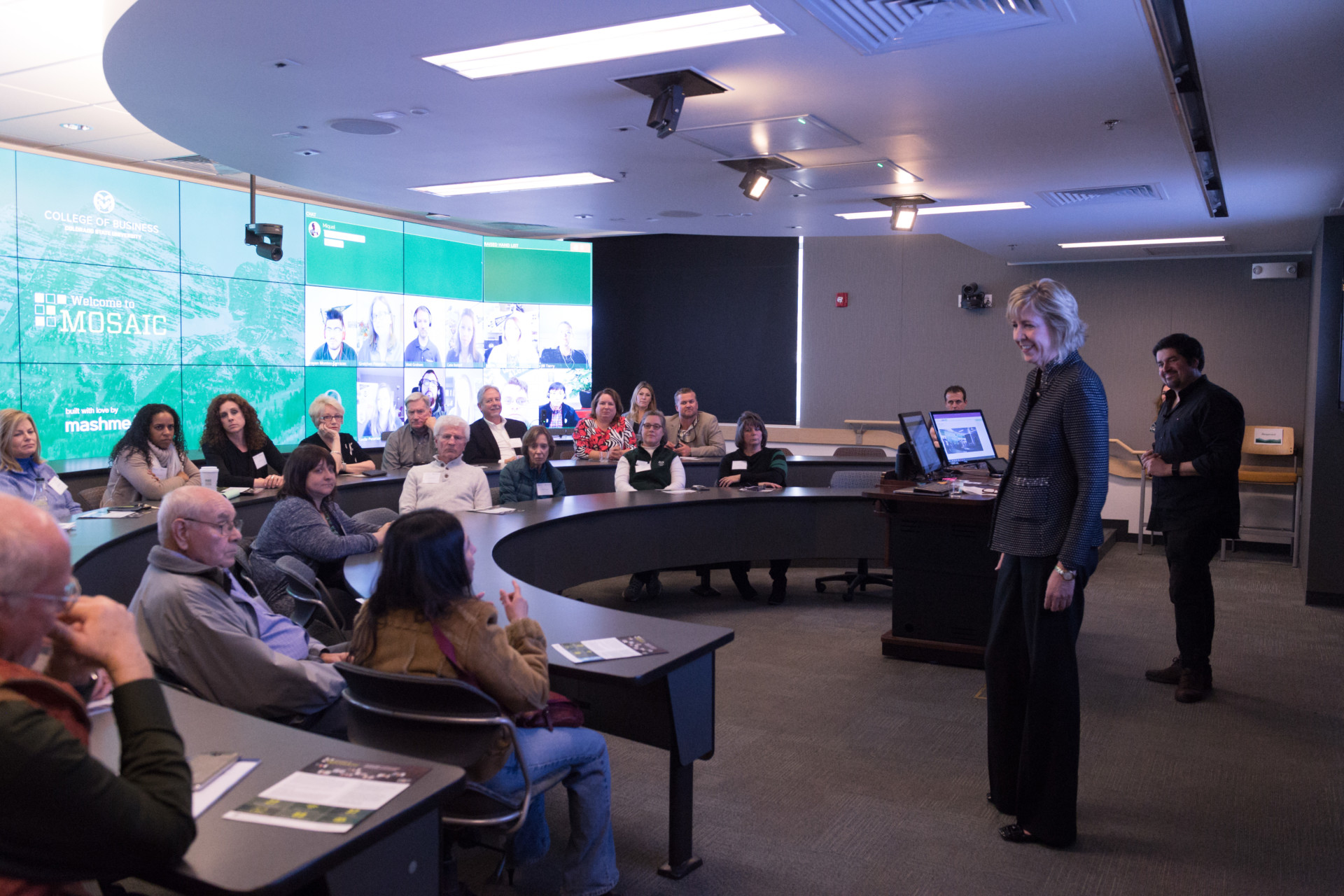
CSU College of Business collaborative classroom.
Photo by CSU Photography
Colorado State University’s College of Business has installed 27 high-video screens to create "the classroom of the future". The screens are on the back wall of a classroom, which accommodates 37 students in the room and 88 remote on the screens. Some universities have gone further with a curved screens 360 degrees around the walls. However, I suggest these are a gimmick, a like flying cars, and are a future of the past.

HD screens and cameras are now not reasonably inexpensive, so it is tempting to fill classrooms with them. However, we should use the technology to overcome the limitations of physical classrooms, not perpetuate them.

If each student is displayed on screen life size, then this is only going to work for a small class, of less than one hundred students. For hundreds of students you would need a huge wall, and the instructor would not be able to clearly see any of them. Also the students in the room can't easily see the remote ones, even in a small room for a hundred students (in Colorado State's example, the screens are behind the students).  This would accurately emulate a large lecture theater, where the instructor can't see most of the students clearly, and students can't see each other, but is that a good thing?

Plan of Jeremy Bentham's
panopticon prison
,
drawn by Willey Reveley 1791.
From Wikipedia
In the modern classroom we don't want students passively sitting listening to the lecturer. We want students talking to each other. Building an electronic version of Bentham's panopticon, with the all-seeing teacher in the middle, and each student isolated, is not the way to do this.

The obvious solution is not to try to mimic the bad features of a physical classroom. Rather than dozens of screens, just have one on each wall, with the image of whoever is speaking enlarged, and everyone else reduced to thumbnails. This is what readily available, cheap or free, videoconferencing software already does. It is what most of the students in  “Room of the Future” see anyway, as they do not have a wall of screens at home.

Friday, June 28, 2019

Zoom Videoconferencing for Low Bandwidth Links

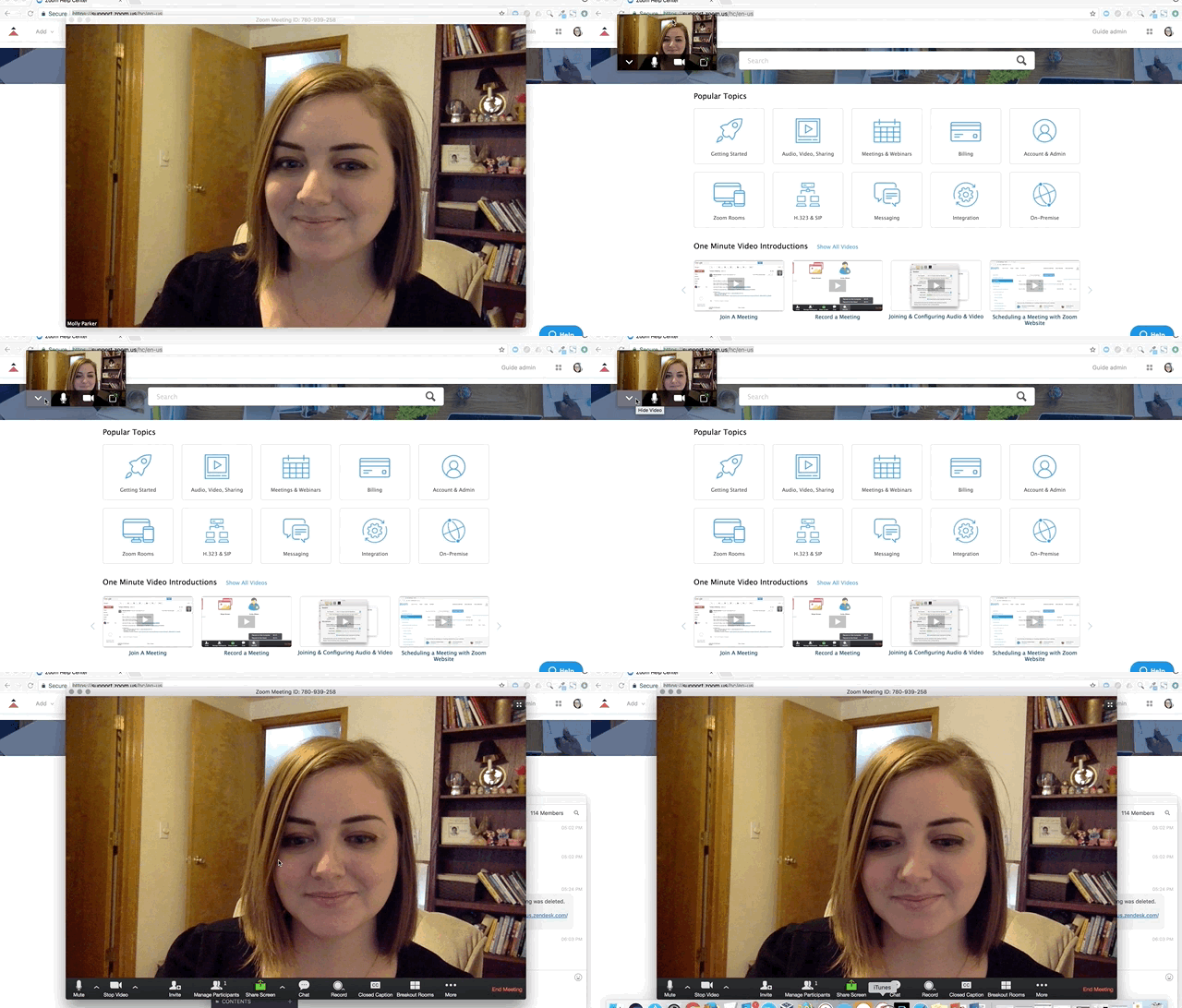
Turning off received video in Zoom
AARnet provide Zoom Video Conferencing to Australian universities, so I end up in a lot of such conferences. This works fine in my university office, with a high bandwidth connection, but not so well when I am out and about on a 4G wireless modem. Zoom lacks the bandwidth friendly features of other videoconferencing software, such as Blackboard Collaborate, but there are ways to make it more usable.

One option if you have a limited or unreliable Internet connection is to use a phone for audio. You can dial into the video conference, and use your phone for the audio, but use the Internet connection to see presentations, and text chat.

If you are presenting, then one approach I suggest is to have a picture of yourself on the first or second slide. This gives your audience something to look at if video is not working. Also you can email the slides to the organizer in advance and let them handle it. They can then send you control of the presentation, or it is not complex, and you are having Internet problems, let them changes the slides when you request it. This way you just need the audio working.

If you Internet connection is limited, you can minimize the Zoom video window, and hide the video. In a quick test I found this reduce data use to one tenth: from 1.5 Mbps, to about 150 Kbps. Most of the data traffic comes from displaying video of the norther participants on your screen.

Saturday, October 8, 2016

Room-based Video and Web Conferencing Merging

Yesterday I had a call from an e-learning support unit, asking if they should install the latest version of Echo 360 with audience response "clicker" functionality. Echo 360 was installed primarily for recording lectures for students to play back later. But it now can provide students with quizzes they can do on their mobile device, live in the classroom (or later at home). So what was a room-based videoconferencing system is offering features of web conferencing (synchronous quizzes) and of an LMS (asynchronous quizzes). The problem then is we have overlapping features from different products.

In this instance I suggested not implementing the quiz function, if it compromised lecture recording. Students are rightly annoyed when a lecture recording fails. Using clickers is not just a matter of enabling software, it requires the "lecturer" to be trained in a new teaching technique.

In the longer term it might be interesting to consider using Webinars for lectures, in place of lecture recording software. Students in the room can then use the quizzes and text chat functions of the Webinar, as can remote students. This can be recorded and made available to students for later replay. This involves flipping the thinking about the form of education, from it being a "lecture" which is broadcast for some who can't attend, to an on-line event which has some participants in the same room (a "lecture theater").

Saturday, September 19, 2015

Still Problems with Video Conferences for Education

This week I took part in an hour long video conference for a course I am a student in. I have been taking part in such events for more than a decade and little progress seems to have been made in the technology, or its application.

The event used Adobe Connect, which does not work quite as well as Blackboard Collaborate. I was using a very high bandwidth fibre optic connection, but even so the quality of the service was not that good. The audio was clipped (I suspect because the presenter had their microphone turned up too loud) the service dropped out every ten minutes or so and I had to reconnect.

However, the major problem was that the tutor spent most of the time talking, making it a monologue, like a badly done, old fashioned lecture. This was because it was too hard for the students to speak. It might have been improved if the tutor got the studnets to each pratice raising their hand and taking over speaking. Of the students I did most of the talking, perhaps because I had the best connection and am used to video-conferences.

Five minutes of the event was taken up discussing when the later events were to be held. The problem is that the particular educational instuion has a policy of using their local time zone for scheduling events, even though their students spread across the world. With the change of seasons, students have to take into account not only the usual time difference between the campus and their location, but also daylight saving. It would be so much simpler if events were scheduled in UTC.

Sunday, June 21, 2015

Time-shifted Learning: Merging Synchronous and Asynchronous Techniques for E-Learning

Draft slides and notes for my talk at the 10th International Conference on Computer Science and  Education (ICCSE 2015), July 22-24, 2015, Fitzwilliam College, Cambridge University, UK. Comments and corrections would be welcome. This is based on the paper with Hao Wu:
Abstract: E-learning techniques are usually classified into two broad categories: synchronous and asynchronous. The core question of this research is how to combine synchronous and asynchronous techniques in e-learning software, so it can have a stronger connection with constructivist education. The benefits and drawbacks of existing e-learning software is looked at broadly. Three popular e-learning packages used at the Australian National University are investigated: Adobe Connect (synchronous), Moodle and edX (asynchronous). The results of a brief survey of edX students is reported. Using the results of this work a team of students at the ANU Research School of Computer Science is now implementing enhanced asynchronous software to be plugged into Moodle and other asynchronous e-learning packages.
Keywords: Asynchronous Learning; Synchronous Learning; Electronic Learning; Web Conference; Videoconferencing; Pedagogy
Please cite as:
Worthington, T. & Wu, H. (2015, July). Time-shifted Learning: Merging Synchronous and Asynchronous Techniques for E-Learning. In Computer Science & Education (ICCSE), 2015 10th International Conference on. IEEE.
Preprint available at: http://hdl.handle.net/1885/13554

Sunday, April 12, 2015

Time-shifted Learning: Merging Synchronous and Asynchronous Techniques for E-Learning

A team of ANU computing students is working on my "Better Webinar Tool For Teaching" concept. The aim is to produce a free open source webinar plug-in for Moodle. The key feature of this is to be that the student can pause a live video/audio session, just as they can time-shift a live-to-air TV broadcast, using a Personal Video Recorder (PVR), such as a TiVo. The idea would be that if you, as a student, are interrupted while taking part in a webinar, you can press "pause", go away for a few minutes (or days), then come back and resume your participation.

On the face of it, adding a pause to webinar software does not sound like much of an advance over products, such as Adobe Connect and Blackboard Collaborate. Those products already provide the option of viewing a recording after the webinar is over. However,  the subtle point is that a pause function in a live webinar blurs the distinction between synchronous and asynchronous e-learning. The function may be technically not too hard to implement, but what does it do to the pedagogy?

Webinar products allow students to do more than just watch a video conference. The student can actively participate by typing in text, responding to multiple choice questions, by speaking and being seen. However, these interactive functions are only available during the live webinar, students cannot interact using the recording after the webinar is over. Such interaction makes no sense in terms of a fixed recoding of a completed synchronous learning event.

Participation after a delay is normal for asynchronous e-learning. Products, such as Moodle, provide functions for students to interact minutes, hours or days apart. Why can't these same functions be used for a synchronous mode? If you missed the live webinar, why can't you still answer the quiz and type in some comments?

There may be some limits place on how long after you can participate in an event, for reasons of practicality and pedagogy. Time limits on student participation are are normal in education [a concept I explored at length in the paper Worthington, (2013)]. But there is no technical reason why the student has to use different software for synchronous and asynchronous modes, or why there needs to be any firm division between the two.

Explicitly allowing for delays may also ease some of the technical constraints on webinar software. Video and audio conference systems normally try to present content in "real time", requiring buffering of the data and delays beyond those inherent in the telecommunications system. An asynchronous system could present information as soon as it is available, even if it is out of sequence. Research shows that people tolerate such mis-ordering if it happens only over a few seconds (and those watching a later recording could have it resequenced).

What seemed to me a relatively simple concept is something I have spent several years trying to explain, to colleagues and to students. My latest attempt is with the PVR metaphor, using the term "Time-shifted Learning". A paper on this is in preparation for later in 2015.

Before settling on "time-shifted" other terms I considered were "pausable" (too clumsy) hybrid (already used as a synonym for blended), time in various ancient languages (already used as product names) and Synchromodal (already used for the combination of live classroom and synchronous learning).

ps: A simple pause function on webinars could also be used as a replacement for lecture recording software, such as Echo 360. A recorded lecture could be thought of as a webinar with no one watching live. Such a function would still be superior to a simple recording, as it would still allow the class to interact later.

References

Worthington, T. (2013). Synchronizing Asynchronous Learning: Combining Synchronous and Asynchronous Techniques. In Proceedings of 2013 8th International Conference on Computer Science & Education (ICCSE), 26 Apr - 28 Apr 2013 , Sri Lanka. URL: http://dx.doi.org/10.1109/ICCSE.2013.6553983
Wednesday, September 25, 2013

Use of Video Capture at Universities Beyond Lecture Recording

The Australian National University, where I teach, has selected Echo360 for recording lectures in lecture theaters. This will replace a bespoke system called "Digital Lecture Delivery Service" (DLD), which has been in use since 2004. So I dropped in for a demonstration of the new system from Jo Williams at Echo360's Perth office (the product was originally developed at UWA in Perth and then commercialized).
It happens I had seen an early version of this system in use at the UWA's Albany campus, when a consultant for government.

At its most basic Echo360 works like DLD in the lecture theater. The audio is recorded from the same microphone used for the lecture theater. Whatever is on the projection screen is recorded as video. This is usually slides, but can be a document camera recording material, including hand drawn diagrams. Optionally a video of the presenter is also recorded. The presenter just as to remember to start the recording and stop it at the end, whereupon the system makes the recording available via the Learning Management System (LMS), in the case of the ANU, this is Moodle. The student just need a web browser to play the video (PC, Apple Macs and Linux).

Students appreciate having recordings of lectures, for ones they miss or want to go thorough again (students where English is a second language find this particularly useful). Also this is a quick, easy and cheap way to create content for a distance education course. Research shows that a recording of a live lecture with poor quality video and all the unedited gaffs is just as educationally useful as a professionally produced video.

Echo 360 offers some intriguing extra features, some already in the product and others in development. The lecturer can record their lecture at their desk, using software on their PC or Apple Mac (unfortunately Linux is not supported). They can also annotate a recording they have made live in the lecture theater with extra notes for the students. Also notes from students can be shared.

Students can pause the recording of a lecture, rewind and fast forward. An intriguing future possibility would be to pause a live lecture. I discussed the possibility of this in the conference talk and paper "Synchronizing Asynchronous Learning: Combining Synchronous and Asynchronous Techniques", and wrote a project proposal for a student to write "Software for Synchronised Asynchronous Constructivist e-Learning". The idea would be to break down the division between what is real time and what is pre-recorded.

Another intriguing possibility is to combine large group interactive sessions with students live in a room and on-line. The use of this form of "interactive engagement" is still controversial at ANU when used just in a classroom, without adding the complication of on-line students as well. However, combining the on-line and classroom students could enrich the experience for both and make it much more lively.

Monday, September 16, 2013

Push-to-Talk Headsets for Webinars

At 1pm AEST (0300 UTC) Tuesday 17 July I am presenting a free seminar on "MOOCs with Books" hosted by SA E-learning Support Services, for vocational educators (everyone welcome). While testing the setup on Friday I found the sound was distorted. It turned out the audio mixing software in Linux was causing a problem, which was easily bypassed.

About every computer based video/audio-conference I attend has a few minutes at the start where people sort out audio problems. Some of these problems can be solved with low cost hardware. Rather than giving new on-line staff and students a useless gift (such as a flash memory wrist strap), a Push-to-talk Headset (costing about $10) would be useful.

Headsets are readily available, some with push-to-talk buttons, but ones with push-to-mute ("cough" function) are rare. So I built myself an adapter to provide this function. The adapter has two 3.5 mm plugs for the microphone and headphone sockets on my laptop. The p[lugs are cabled to a small box with two switches and two sockets. A toggle switch selects microphone off/on. With the switch in the off position, a press button provides "Push-to-Talk". With the switch on the off position, the button provides "cough" function (pressing the button cuts off the microphone). There are 3.5 mm and 2.5 mm sockets for different headsets. The parts for this cost about $12.