Showing posts with label blue screen. Show all posts

Sunday, November 28, 2021

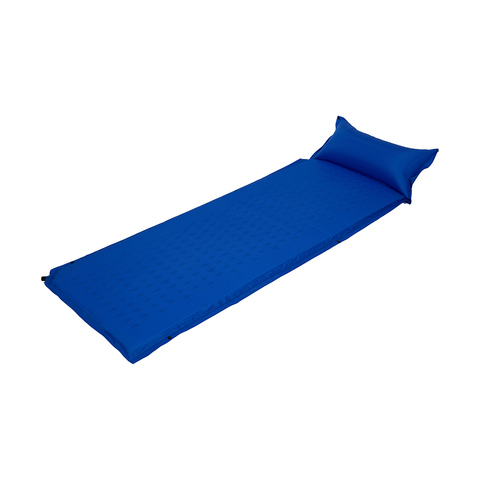
Self Inflating Blue Screen for $60

Self Inflating Blue Screen
as Background
Self Inflating Blue Screen
with background in Zoom
Still on my quest for a low cost, lightweight, movable background screen for video conferences, I am now trying one which is self inflating. Preparing for a camping trip, I got out the sleeping mats and was going to show to someone on Zoom. I then realized that the mat is rigid enough to stand up by itself and is similar in color to a chroma-key blue screen. 

Single Self Inflating Mattress
I have two mats with clips along the sides to make a double. So I joined them, and stood them up behind me, set Zoom to use blue, rather than green, screen and it worked. The dimpled pattern on the mats, and the join between them, are hidden by Zoom's algorithm, and the blue background is replaced with whatever image I choose.

These are two Single Self Inflating Mattresses ($19 each) from a local store. They are 650 x 1900 mm each, and three would be needed for a practical screen (1,950 mm wide), which would stand up by itself.

Saturday, July 24, 2021

Lighting for Video Conferences

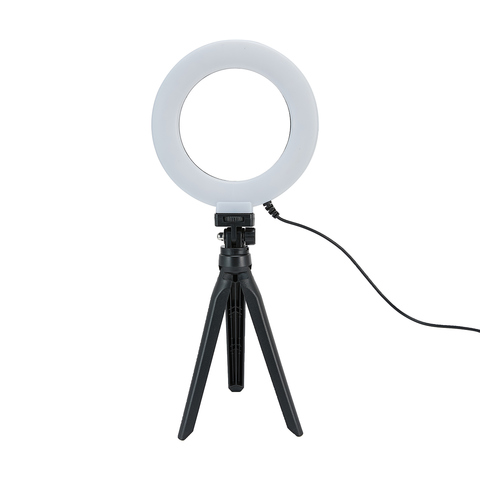
6in. Tabletop Selfie Ring Light

 When using a virtual background with video conferencing, it is important to have even lighting, otherwise part of you may be chopped off, or the real background visible. Any office lamp will do, but there are ring lights available specially for this purpose. The ring lights have a circle of LED lights,and are designed to go around the camera lens.  I find it too distracting to be looking directly into the light, so instead have it at 45% pointing at the wall, behind my computer screen. This reflects a soft light onto the background.

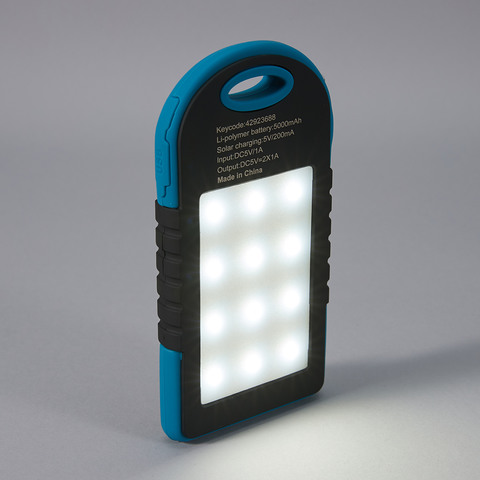
Power-bank with light
Ring lights are available in different sizes with clamps, and stands. Some also have a clamp for a smart phone (and are called "selfie lights). The one I have has a desktop tripod and can be rotated and swiveled. It cost $8 from a local store and plugs into a USB power supply. For portable use, away from mains power, I also have a power-bank, with a built in flood light and USB sockets for ring lights ($19 from a local store). 

Telephoto Lens for Closeup in Zoom Meetings

2x telephoto lens & virtual background in Zoom. 
Tom Worthington, 24 July 2021 CC BY
Web cameras tend to have a wider field of view, than needed for one person attending a video conference. This makes the camera easy to set up, but shows more of the background and less of the speaker. My Logitech C615 webcam has a 74-degree field of view. So I purchased a 2x Telephoto clip on lens.

The clip-on lens is designed for use with a smartphone camera, but works well with the camera in a laptop or stand-alone web camera. The lens is screwed onto what looks like a clothes peg, which is clipped over the camera. It takes some effort to position, but is then held firmly.

198 Degree Fish-eye Lens, 
Tom Worthington,
24 July 2021, CC BY
With Polarizing Filter, 
Tom Worthington
24 July 2021, CC BY
I purchased a kit*, which came with fish-eye, wide, and macro lenses, as well as a polarizing filter. The fish-eye or wide-angle lenses might be of use for showing the general view of a room, but distort the image. The polarizing filter is useful for removing reflections from my glasses, however it can't be used in conjunction with the telephoto lens.

Without telephoto lens.
Tom Worthington,
24 July 2021 CC BY

With 2x Telephoto Lens. 
Tom Worthington
24 July 2021 CC BY
As well as narrowing the view, so less of the room is visible, the telephoto lens also makes the background slightly out of focus. This is useful for concentrating the viewer's attention on you in the foreground. Otherwise they might spend their time reading the titles of the books in your bookcase. ;-)

The narrower view also allows a smaller green screen to be used for a virtual background. In the example shown, I am using a sheet of lime green polyester acoustic pin-board, 1200 mm x 800 mm ($30.50 from a hardware store). 

Most of the clip on lenses sold for smart phone are wide angle. It took me some time to find a telephoto. One online store sent me a wide angle instead of a telephoto. So for the first time, in a long time, I went into a camera store. The kit I purchased is an Apexel 5 in 1 Clip on Lens Kit ($19.95 from Ted's Cameras, Canberra Center). Note that you will only need a 2x telephoto lens and there are higher quality units available separately at a higher price.

Friday, July 23, 2021

Folding Lilac Screen for Virtual Zoom Background


The second hand folding room divider

Lilac folding screen, in Zoom
with virtual background. 

Vertical fold lines visible. 
Photo by Tom Worthington,
 23 July 2021 CC BY
Lilac folding screen,
v
ertical fold lines visible. 
Photo by Tom Worthington,
 23 July 2021 CC BY
, I painted blue for virtual backgrounds, was too dark to work well with Zoom. So I went back to the paint shop and had a lighter shade made up. This was intended to be a bright blue, and the hex code for the color looks blue on screen (#0061FF). However, the paint looks more Lilac, but works well with Zoom.

QR Code for 
Bright Blue #0061FF 
from
 
Taubmans Coloursmith

Tuesday, July 20, 2021

Folding Blue Screen for Under $20

Blue folding screen,
with vertical fold lines.
Photo by Tom Worthington,
 20 July 2021 CC BY
The second hand folding room divider , I painted green for virtual Zoom backgrounds, works well but what if I want to wear green? The most common alternative to green, as a chroma key background, is blue. So I painted the other side of the divider blue. This did not work as well with Zoom as the green side.

QR Code for blue, from the 
Taubmans Coloursmith application
There appears less standardization on the shade of blue used, compared to green. I chose Hex color #0047BB (close to PANTONE 2728 C), as one of the most common mentioned in the literature. I uploaded an image this color to the Taubmans Coloursmith application. This produced a barcode, which I took this to the local hardware store to have a sample paint pot made up (less than $10 for 250 ml).

Blue
Blue folding screen, in Zoom
with virtual background. 

Vertical fold lines visible. 
Photo by Tom Worthington,
 20 July 2021 CC BY
Zoom was not able to delineate the dark blue background as well as the lighter green. Also the joins in the screen showed more than with green. The paint looked darker, and more purple than blue, when painted on the screen. 

QR Code for 
Bright Blue #0061FF 
from
 
Taubmans Coloursmith

The literature points out that a blue screen will need more light than a green screen. But it may be that a less dark shade of blue would work better in an office, where studio lighting is not available. The lightest possible shade of this would be #0061FF
. Another option would be the "Hi C Blue" (#0174b3) which is one of the standard colors of the Taubmans range.

Green
QR Code for green, from the 
Taubmans Coloursmith application
I also used the Colorsmith application to make Chroma Key Green. This looks almost identical to the Dulux Zatar Leaf color I had made previously.