Showing posts with label emergency management. Show all posts

Saturday, July 20, 2024

Commenting on the Great Computer Outage of 2024

Stop Error on a Screen
at Coles Leichardt, 26 July 2024.
Photo by Tom Worthington CC-BY
My phone started ringing on Friday afternoon. First it was the SciMex Science Media Center in Adelaide: could I talk to the media on the computer outage? What computer outage? I had been driving interstate and hadn't noticed many shop, airline, and other systems were down. What I had noticed were that both ABC Radio Sydney, & ABC Radio National were off the air (more correctly  broadcasting  apology loops, indicating the transmitters were okay but programs were getting to them).

At this stage the indication was it wasn't a cyber attack, and was not at the network level (my mobile phone still worked). It was the operating system. So I made a general comment to go out from SciMex to the media. At this stage the ABC had a report suggesting it was from the Crowdstrike security software

My phone then starting ringing. Sky new wanted to interview me, but their Zoom and phone interview facilities were not working (due to the it outage?), and it was not feasible to get to the studio. I talked to ABC Radio Queensland, who said they had one microphone and a CD player working. A little known fact is that if all the fancy automation fails in an ABC studio, one microphone is connected to the transmitter for emergency broadcasts. At the end of the interview I asked them to play "A Walk in the Black Forest" (the only track Radio Goodies had), but the joke went flat. 

One 24 hour TV news network wanted me to come to their studio across town because they could not do a Zoom or phone interview (presumably because the equipment for that used Microsoft Windows). I was tempted to suggest they hold the phone up to the camera.

I made the right call to say it was not a cyber attack, & resisted the temptation to criticize Microsoft Windows. Something I found surprising was the range of devices apparently running Microsoft Windows. Why would you use it for an airline or supermarket machine, rather than an operating system designed for real time embedded applications (such as one of the Linux variants)? 

See also (updates):

Wednesday, March 27, 2024

Preparing for Solar Storms

Tom Worthington with the Telstra Tower in the distance.
Picture by Gary Ramage, Canberra Times,
published 25 March 2024. Reproduced by permission
In an interview with
The Canberra Times last week, I pointed out that space based telecommunications are vulnerable to solar storms, so terrestrial facilities such as Telstra Tower remain useful (Why Telstra Tower could save us in an apocalypse, Lucy Arundell, March 25 2024). As it happens, the Australian Space Weather Forecasting Centre (part of the Bureau of Meteorology), issued a severe space weather WATCH the day before the article was published: "The effects are expected to be significant. Increased awareness of critical infrastructure is advised." The alert was cancelled the next day. The following Tuesday I was interviewed on radio about the same topic.

My comment on solar storms was a throwaway remark, but the journalist identified it as the most interesting aspect of the interview. I often find such insights when being interviewed by journalists.

Tuesday, May 9, 2023

Social infrastructure stronger than concrete

Daniel Aldrich
Greetings from the ANU College of Asia and the Pacific, where Daniel Aldrich is speaking on "Modest but critical: how we overlook social infrastructure at our peril". He argues that facilities like parks, churches, and libraries make communities more resilient when there is a disaster, to such extent that they reduce deaths due to a disaster more than hard infrastructure, such as sea walls. I asked about online social infrastructure and Dr Aldrich suggested that hybrid was best, combining physical infrastructure and online. 

It occurs to me that hybrid also makes public funding easier. It will be much easier to convince a politician to spend money on online forums, if they are associated with a building they can open. However, this may require new skills, and tools of those managing the infrastructure. As an example, public libraries host events, but these are purely physical. Similarly the act of going in to borrow a paper book is social, in that you might bump into someone. However, if you borrow an e-book, or audio book, online, it is just you and the computer. It would not be difficult to add some social aspect online, given you know what books people are interested in. However, libraries tend to use off the shelf electronic borrowing systems without a social aspect.
In answer to another question, Dr Aldrich speculated that there might be social spaces where leaders congregate. There are, and occasionally I stumble into them. One is the green room at a conference, and another is the cafe at Parliament house Canberra. There are a plethora of such places for different groups, such as the Bangalore Club (which I stayed at recently),  and affiliated institutions.

Tuesday, March 30, 2021

Training for the Next Emergency at Your University


The COVID-19 pandemic is not over yet and there are other foreseeable challenges as great in the near future, so perhaps it is time for universities to ensure they have staff qualified in Emergency Management. TAFE NSW National Center for Emergency Management Studies are offering qualifications and training in areas very relevant to higher education, such as Critical Incident Messaging, Working with Spontaneous Volunteers,  Commanding Under Pressure, Political Acumen for Emergency Management, Business Continuity Planning, and Exercise management for emergencies.

An emergency becomes a disaster only if we are not prepared for it. In early 2020 I activated the online option I had built into my learning design. It was still not easy, but much easier if I had not planned for this foreseeable event. 


Saturday, August 8, 2020

Hacking the Virtual Hackerthon


Greeting from the Virtual Hackathon on Fighting Pandemics. This is organized by the Australian National University Humanitarian Innovation Society (ANU HISoc), with the Clinton Global Initiative University and IBM. We have had an introduction from the organizers at HISoc, and a design thinking workshop from IBM. I will be talking about better logistics at 2:15pm. The opening sessions used Remo Conference, and I am impressed that the organizers have been able to get it to work so well, but Remo needs improvements to be usable for education.
Remo Conference

Remo Conference
Remo Conference

Remo Conference (Version: 2.13.5) takes the "conference" part of video conferencing more literally than other products, with an interface which looks like a conference room floor plan. Participants can be pre-allocated to tables, with a tiny picture of them, labeled with their initials, around the table as if seated. Spare space at the table is indicated by empty chairs. Those at a table can see and hear each other with the video windows appearing at the top of the screen. Participants can move tables by double clicking on another. Some tables may be reserved for MCs and a help desk. The MC can call all participants to a presentation, at which point the table conversations shut down and a large window opens for the presenter. When in presentation mode Remo Conference looks much like any other webinar product, with a presentation window, chat, Q&A and Raise-Hand functions.

The room metaphor is a good idea, but Remo's implementation takes it a bit too literally. One problem is that when the participants arrive there is no sound and no welcome. I spent a lot of time trying to work out why my audio was not working, but it was just that no one was talking: we were all waiting for something to happen. It would be useful if there was some sort of avatar to show us to our seats and some sort of background hum of the crowd. 

Also the fixed room layout does not make best use of screen space. When at a table, having all other tables displayed is a waste of space. It would be better if the interface zoomed in. There is a text chat window, but I could not find a way to resize it, so it obscured things I wanted to see. However, the largest problem is the video does not work well on a slower link.

This is my fourth attempt to use Remo. The first two times I did not manage to see or hear anything. The third time it worked, sort of. This forth time it is usable, but only just. The problem is that like many video conferencing tools, Remo have assumed the user has high speed broadband. As a result on my low speed connection Remo barely works, at the best of times. This is unfortunate, as Zoom have shown this does not need to be the case: Zoom adjusts well for a lower speed link. In Zoom, if I make the window smaller the resolution of video reduces and with that the data transmitted. This doesn't happen with Remo. Even if I minimize the window, so no video is visible, Remo still uses more than 1 Mbps, whereas Zoom uses much less.

The video data use in Remo seems to vary depending on the resolution the video participant is transmitting. During this week's CBRIN First Wednesday, everything was working okay with Remo, until the MC appeared. At that point I saw a blurry closeup of their face frozen on screen. Then a pre-recored YouTube video started and worked fine, but before then end this was interrupted by the MC again as a huge still image. What appears to have been happening was that the MC was in HD video which my system could not cope with. The YouTube was low resolution and worked fine, but was interrupted by the HD again before it could finish playing.

All this discussion of low resolution may sound irrelevant to those with high speed broadband: why not just spend a few dollars and get decent broadband? I could do that as I am relatively well of, and live in a first-world city which pioneered fiber to the node decades ago. But many people can't afford, or can't get, high speed broadband. 

For-profit companies can simply ignore customers without high speed broadband, reasoning these people don't have enough money to be worth worrying about. As an educator, it would be unethical, and perhaps unlawful, to discriminate against students in this way. So when COVID-19 hit I decided to forgo the high speed broadband I had access to and instead make do with a high latency low speed 4G mobile broadband connection My connection works at around 1.5 Mbps, which is is part of the ANU Recommended student system requirements.

If a service doesn't work on low speed broadband, then some of my students, who are now scattered around the world, may not be able to use it. Although Remo recommends a minimum of 8 Mbps, it just about works at 1.5 Mbps. I suggest the developers implement video bandwidth adjustments, like those in Zoom, to make it usable for those who can't afford, or can't get, high speed broadband.

Friday, July 31, 2020

Better Logistics for Fighting Pandemics

Health Innovation Hackerthon
The Australian National University’s Humanitarian Innovation Society (ANU HISoc), along with the Clinton Global Initiative University and IBM are holding a virtual hackathon from August 8, 2020 on Fighting Pandemics.

Organized for and by students, teams will work on pandemic management with lessons from SARS, MERS, Ebola and COVID-19.

I am helping out with Track 2: Creating faster and more efficient resource allocation systems. Below are some notes I am preparing for the students. Suggestions, comments and contributions are welcome.

Track #2: Creating faster and more efficient resource allocation systems

"How can we better manage logistics so crucial personnel, medical supplies and equipment are quickly allocated to places where they are needed? " From ANU HISoc

Logistics

Modern warehouse with pallet rack
storage system
(Wikpedia, Axisadman / CC BY-SA)
"Logistics is generally the detailed organization and implementation of a complex operation. In a general business sense, logistics is the management of the flow of things between the point of origin and the point of consumption to meet the requirements of customers or corporations. The resources managed in logistics may include tangible goods such as materials, equipment, and supplies, as well as food and other consumable items. The logistics of physical items usually involves the integration of information flow, materials handling, production, packaging, inventory, transportation, warehousing, and often security. " From: Logistics, Wikipedia (2020, June 30).

Pandemic

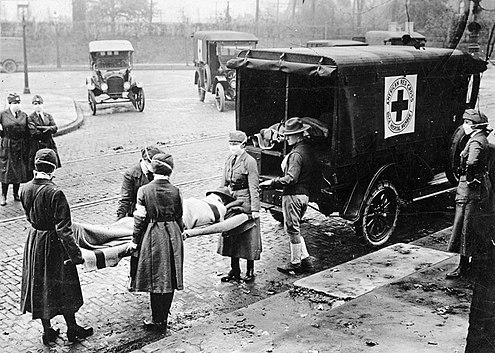
1918 Flu Victims St Louis
(Wikipedia, Uncredited photographer
for St. Louis Post Dispatch / Public domain)
'A pandemic (from Greek πᾶν, pan, "all" and δῆμος, demos, "people") is an epidemic of an infectious disease that has spread across a large region, for instance multiple continents or worldwide, affecting a substantial number of people.' From Pandemic, Wikipedia (2020, June 30).

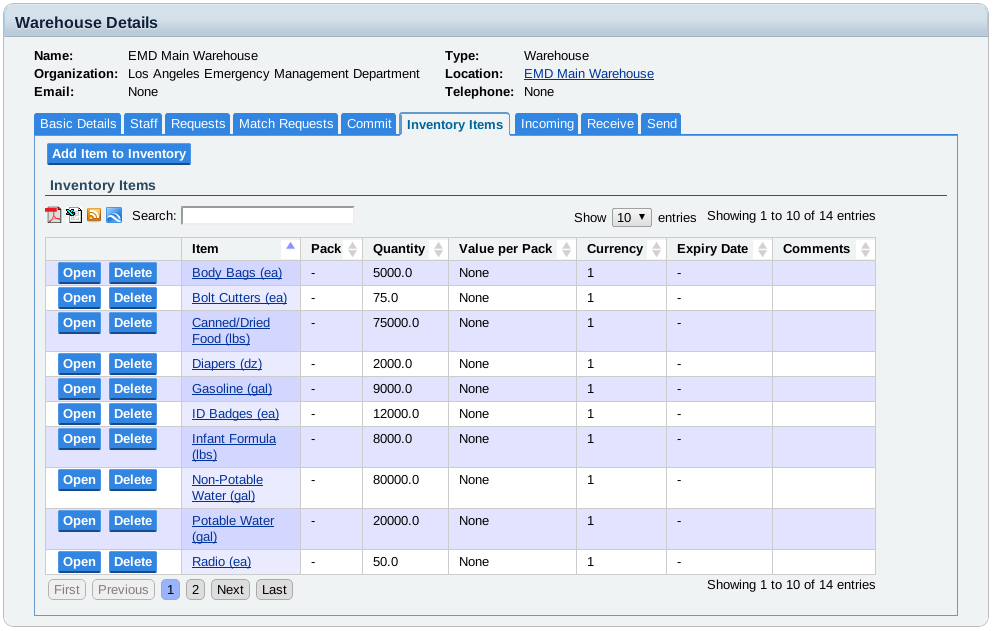
Sahana Disaster Management System

Warehouse Inventory Page fromSahana Eden (2014)
"Sahana is a Free and Open Source Disaster Management system that has been deployed with Gov, NGOs and Civil Society in enabling effective coordination and resource management particularly in a coordinated multi-agency response. The project has its inception during the Boxing Day Indian Ocean Tsunami of 2004 that required a large scale response effort bringing together multiple partners to help 500,000+ victims including displaced and injured in Sri Lanka." From Sahana Applicability for COVID-19, Wikipedia (2020, June 30).

Some questions for the hackerthon participants:

  1. Who are you helping manage the logistics?
  2. What is being managed (personnel, medical supplies and equipment)?
  3. How are places and need identified?
  4. How are resources allocated?

See also:

  1. E-government for emergencies: dealing with a bird flu pandemicusing the wireless web and podcasting, Tom Worthington, for CeBIT Australia, 9 May 2006, Sydney
  2. Sahana Meetup with Tom Worthington, Sri Lanka, 2013

Thursday, April 9, 2020

Blended Learning Challenge for the ACS Flatten the Curve Hackathon

The Australian Computer Society is running a Flatten the Curve hackathon, to develop prototypes in 48 hours to counter the  COVID-19 Coronavirus. Registration closes 3:30 pm 9 April, and the event starts at 9pm. The challenge I have submitted is Blended Learning for a gradual return to campus, and so if there is a further outbreak of disease online learning can be quickly implemented. This will require tools, teacher training, and changes to government policy.

Saturday, April 4, 2020

Plan a Gradual Return to the Classroom with Blended Learning

Most educational institutions had to scramble to convert courses for online delivery due to the  COVID-19 Coronavirus. Those educational institutions which were already providing large scale e-learning, and those who took my advice in 2017 to be ready with online learning in case of a crisis, have had less difficulty. A more orderly move back to the classroom can be planned, when the virus is under control in the next few months. This could use blended learning, with on-campus components gradually added to the blend. However, the online components should be retained for all programs, in case of future emergencies, and to cater for individual student needs.

It is not feasible to set a deadline when all classes return to "normal" campus-based teaching. Rather than having all students stop online learning at once and return to campus on the same day, stagger it over weeks, or months. Students would be on campus initially for only a few classes. Some students will be unable to return for medical and other reasons. 
 
With a gradual return there would be fewer students on campus, allowing for easier social distancing. Further COVID-19 outbreaks are possible, until a vaccine is widely administered. If there is a further outbreak, the decision to move back to online learning would be much easier. There would be no difficult decision to declare a campus "closed". Instead the on-campus options would be swapped out and the online equivalents used, for as long as is required. This could be done just for a particular group of students who may have had contact with a person found to be infected, rather than closing the whole campus.


Australian institutions should include online learning, as part of permanent contingency planning, as was done by some institutions in our region years before the current emergency.

Blended learning will also better suit student needs and the reality of how they now study. The idea that most university students were "full time" and  "on-campus" was a fiction. Even before COVID-16, most students did not attend most lectures, in the typical Australian university program. Many students have families, or jobs, or both, competing for their time, making them effectively part-time students, studying mostly online. The opportunity can be taken to redesign programs, to provide blended learning. 

The distinction between on-campus and online students can be removed, along with full and part-time, domestic and international. The typical student will likely study 20% on campus and 80% online. But students should be allowed to choose the blend which suits them. Courses and programs can be flipped, with a design for online delivery, plus some campus-based elements added were appropriate. If Australian universities do not offer these options, domestic and international students seeking them will be required to enroll at overseas institutions.

Professor Marginson of Oxford University, has suggested treating online learning as a different product with a "separate pricing structure” (Coronavirus: global student flows to suffer ‘massive hit’ for years, Ellie Bothwell, Times Higher Education, 26 March 2020). However, offering cut-price online degrees could risk the reputations of institutions, and countries, for quality education. Blended learning, could incorporate some online learning, but be seen to be a quality product worthy of the full fee.

Australian higher education policy should be changed to accept blended learning as the default, for both domestic and international students. Australia should focus on quality education for all students, wherever they are. This will reduce the burden from unworkable regulations, which have been waved during the current emergency. It will also provide a competitive advantage for Australia in a more competitive international education market.

Sunday, March 29, 2020

Zen Martial Arts Maxims for Online Teaching

To those working hard to move courses online, due to the  COVID-19 Coronavirus, remember there is no need to replace every lecture with a video, every tutorial with a webinar, or every paper examination with an online test. I recommend the Zen martial arts maxims: Economy of effort, Realism, and Switching smoothly between techniques.

In 2014, as a student of online teaching I was required to write a personal Theory of Practice. I decided to apply Zen martial arts maxims:

1. Economy of effort

Meditation, Created by Jens Tärning from the Noun Project, CC-BY 3.0, 2014
Meditation, by Jens Tärning
from the Noun Project,
CC-BY 3.0, 2014

Martial arts emphasize maximum results from minimum effort. Similarly, learning is a means to an end and so should be done efficiently: using just enough resources to get the job done. However, most theories of education ignore the cost of an activity. There tends to be an inappropriate emphasis on trying in education, rather than succeeding.

2. Realism


Education needs to provide the student with useful skills. Students will need to start with simplified exercises, but need to be exposed to increasingly realistic problems. My students either have jobs or are training for a specific role as a professional, their studies are therefore focused on obtaining skills for that job. By providing student exercises which are based on their own workplace, or a reasonable simulation of the workplace, the students are motivated and learn useful skills.

3. Switching smoothly between techniques


Educational literature is full of explanations of why one principle, theory or technique is superior to another. But one approach will rarely do for all situations. Educators need to move smoothly from one technique to another. Students will need times when they learn alone and then others in a group. They can learn the basics using a simple drill and practice computer program (based on behaviorism theory) and then explore advanced topics with other students.

From the chapter "Theory of Practice", of the book Digital Teaching In Higher Education by Tom Worthington, 2017.

The Zen maxims are from Bruce Lee's Tao Of Jeet Kune Do
(Lee, 1975).

Saturday, March 28, 2020

Free open source alternatives to Zoom for Videoconferences

I spent much of the week in Zoom based video conferences, only one of which did not work. This is remarkable, given how heavily Zoom is being used due to the COVID-19 Coronavirus. In contrast, I had considerable difficulty with Blackboard Collaborate. Collaborate seems to be less able to cope with my 1 mbps broadband connection than when I used it at 28.8 kbps dial-up speed in 2011. 

There are also some open source video conference products. Hamza Mu has detailed 15 of them in "Top 15 Open source Video conference and Team Communication Solutions for Windows, Linux, Mac OSX and Phones (Medevel.com, 30 Mar 2019). The only one of these open source products I have used is BigBlueButton, which is commonly teamed with the Moodle learning management system. However, Apache OpenMeetings looks interesting.

However, these video conference tools have not changed much, from the user's point of video, for decades. The quality of the video has improved, but that is about all, and that is about the least important aspect of a video conference. These events should really be called audio conferences with a shared screen and optional video.

Wednesday, March 25, 2020

Tuning Zoom Videoconferencing


Today was my third video conference for the week, Reading the Corona: extraordinary responses during an extraordinary time, hosted by the ANU Indonesia Project. Chatib Basri and Rizki Siregar discussed policy options for dealing with the the COVID-19 Coronavirus in Indonesia.
With 300 participant, this Zoom video conference had many more than those yesterday, but worked much better. This is a good way to keep in touch, but I am worried about the amount of bandwidth which might be used. So I tried shaping (limiting) my network connection.

Shape Your Video Conference

I am using 4g wireless broadband, with two out of five bars of signal strength, running at 2.63 Mbps download, 1.54 Mbps upload and a ping speed of 34 ms from Canberra to Sydney (at other times it has been 9.1 Mbps download, 12.8 Mbps upload and pink speed of 29 ms). That is modest by current standards, but adequate for attending, and presenting at a Zoom video conference.
I stared shaping with 150 kbps, which is Zoom's recommended minimum, for screen sharing plus a thumbnail video. But Zoom reported an unstable link and it was unusable. Increasing to 512 kbps worked well. The video was then at 256 x 144 pixels and 5 frames per second (sometimes 320 x 180 at 12 frames per second). Shared screens were very clear at 1440 pixels wide, with a small, but clear, video window next to them.

Yesterday I was using video conferencing via the Australian National University's very high speed network. I discovered I could reduce the data requirements for Zoom by keeping the video window small. Today I am using a much slower cellular modem wireless connection. But with the bandwidth shaped, and resulting lower resolution video, the experience is much better than on the higher bandwidth connection.

I used the Linux tool Wondershaper to slow down my network connection, but there are similar tools for other operating systems (and using routers). Wondershaper is not ideal, as it slows down everything, not just Zoom (other tools can select just one application to shape). Of course it would be better to tell Zoom to use less bandwidth, but I have not been able to find a way to do that.

Flip your Video Event


Keep in mind that glitches happen with video conferences. Yesterday I had four scheduled Zoom meetings. The first two worked flawlessly. The third had some glitches, and the last did not work at all.

I suggest 'flipping' the format for online events. That is, provide the presentation slides and, if possible, a short recorded video by each speaker beforehand. That way, if there are intermittent problems, the presenters can skip the full presentation and go straight to questions. Also I suggest reducing the length of events, and break them up into segments of no more than ten minutes. For example, instead of an hour long seminar, make it 15 minutes, including 5 minutes for questions.

Organizers need to be ready to switch off the video, leaving just slides and audio, if there are bandwidth problems. Also the organizers should have copies of slides and be ready to manually change them, if the presenter has difficulty doing that at their location. They should be ready to just talk, with no slides, as I have told ANU TechLauncher students

Tuesday, March 24, 2020

Use Video Conferences to Keep in Touch But Conserve Bandwidth

Greetings from the Australian National University (ANU) in Canberra, where I just took part in the inaugural Virtual Morning Tea (VMT), for early career academics. These will be held weekly by the  ANU Network for Early Career Academics (NECTAR). There will also be more formal regular online seminars, but the VMT is an informal drop-in sessions to avoid social isolation. While this is a good use of technology, it is also a good idea to conserve the use of the public data networks, as there is likely to be high use of the coming months. So here are some tips. The video conferencing product being used was Zoom, but other products are likely to behave similarly.

It is possible to reduce data use, simply by using a small video window. With video full screen, I have found that Zoom uses about 1,000 kbps. If I reduced the size of the video window to around 512 by 240 pixels, the data reduced to 300 kbps. Minimizing the video to a "thumbnail" (200 by 112 pixels) reduced data to 220 kbps. Hiding the video reduced data to 120 kbps. This is consistent with Zoom's documentation: 1.2 Mbps for HD video, screen sharing with  video thumbnail at 50-150kbps, and screen sharing only with no video thumbnail 50-75kbps.

During a formal presentation, video is really only needed at the start to introduction the speaker, and at the end during questions, if at all. In between there are usually slides to look at, so the video can be minimized, or hidden. I suggest participant adopt that way of viewing, and if possible, event organizers set this up as the default.

There are other ways you can improve video meetings, especially with careful preparation. The aim is to have the live video meeting as just one element, ideally a non-essential one. Much can be done with text based communications, which are less demanding of networks, to keep people in touch.

Zoom, and other video products, adjust to the bandwidth available, but then tries to use all that bandwidth. This makes them poor online citizens, like someone who fills their trolley with toilet paper, if you let them. wink

As there is likely to be a high demand for Internet access over the next few months, I suggest that providers of video conference products set defaults to use less bandwidth. At the very least they could be set so only a small video window appears by default. Also they could provide a low speed option which uses no more than 256 kbps, and this could be made the default setting. As an example, Zoom has a maximum bandwidth setting, but this is disabled by default. This should be enabled and set to no more than 256 kbps.