Showing posts with label video. Show all posts

Thursday, October 27, 2022

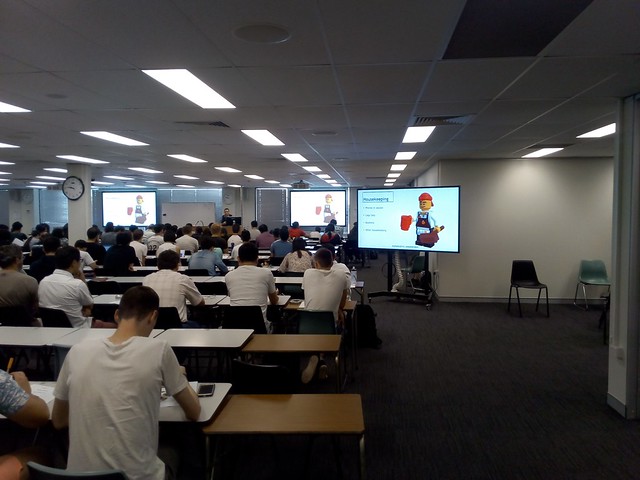
Lecture Theatre Video Screen as an Autocue

Last week I was called in at short notice to record a video to promote the university internationally. Our award winning filmmaker set this up in a lecture theatre, as it was raining outside. The camera was pointing out the door into the open plan area to provide some atmosphere. So I was looking to the front of the room. We did not have an autocue, so I brought up the script on the large screen at the front of the room. I could see this over the camera operator. If I did not have an electronic copy of the script, I could have used the document camera on the lectern to project from paper. Might be useful for ad-hoc recording.

Wednesday, October 26, 2022

Chat Show Format for Live-from-the-Classroom Events?

Frankly set, ABC TV, 2022
Recently I attended a recording of ABC TV's Frankly chat show. This got me thinking that the same studio layout, and format, could be used for hybrid delivery of learning. Frankly uses a standard chat show format: the host sits stage left, with space for four guests beside them. There is a flat area in front for a couple of rows of small tables for audience members who will appear in reaction shots. The rest of the audience are in theatre seating behind. ABC TV use movable cameras with operators. For education we could make do with fixed, voice operated cameras, preset on the presenter positions, and audience.

This room setup would combine features of the flexible flat floor classroom, with those of a traditional lecture theatre. It could be implemented by removing some rows of seating in a fixed lecture theatre, and more easily in rooms with retractable seating, by partial retraction, leaving enough space for tables. The idea is to provide a more interactive up-front (literally) experience for those students who want it, while those who prefer to sit back can. It will also provide a more lively experience for students participating online in real time, and those watching the recording later.

Monday, September 5, 2022

Bluetooth microphones for low cost team teaching & events audio?

Alead Nolan MIC2
Bluetooth Microphone
Lewinner Lavalier Microphone

Sitting in a meeting discussing ways to provide audio for team teaching and events at universities. Rooms are normally equipped with a couple of microphones for teaching. But for more active classes, and events, there may be a half dozen people speaking. Buying professional grade microphones gets expensive. 

Blue Tooth 5.0 Transmitter
Receiver
Audio Adapter

There are Bluetooth lapel microphones for around $100. But other small units designed for making ordinary headphones wireless, at about $20.

The output from multiple Bluetooth microphones could be received by a laptop, or tablet computer and combined using a mixer app (with no additional hardware required). Anyone know of such a setup, please let me know. 

Tuesday, July 26, 2022

ANU Techlauncher Learning to Reflect Introduction


Today I had the delight of being in a classroom with the Australian National University's Techlaucher students, as well as those joining online (video available). Normally I stick to the mechanics of how the "Learning to Reflect" module I supervise is run. The staff of ANU Careers provide the actual content, running students through exercises to help them think about a career. However, after reading Becoming by Michelle Obama, I was inspired to talk a little about my own career. The point wasn't big-noting myself (well not entirely), it was to show a career is rarely a straight linear path. I happened to join ABS, just as they had millions of dollars for IT training I joined the DoD computer division only to have it abolished ending up in the nation's military HQ. I nominated for VP of the ACS, but ended up President. I joined ANU to do research and ended up teaching. The latest coincidence is that I went to an ACS meeting last night, and it was the launch of the new version of a computer job analysis used in Techlauncher. The person launching it happened to have an interest in training computer people in Indonesia, as do I ...

Wednesday, July 7, 2021

Tools for Creating Educational Videos With No Video Editing


From my arrival in academia, 20 years ago, I have been looking for a way to create multimedia educational content without having to record and edit video. In the early days video took a lot of bandwidth. The networks have become faster and the compression technology better, but this can still be a problem for some students (and staff). Also video take considerable time and skill to produce. I don't lack the skill (I learned video production for training at the Canberra Institute of Technology, back when it was ACT TAFE). But I do not want to spend my time lining audio up with video clips. What I have aimed for was something like slides with an audio commentary. 

As an early attempt I used a system which would play an audio file and synchronize this with  HTML content. That works but was not really stable enough to be usable.

For the last two years I have been using Vidnami, which appears to have been developed more for marketers, than educators. With this I provide a script in the form of plain text and the system finds suitable stock video and images, creates synthetic audio, an option music track and makes a video. Normally I would substitute my own presentation slides for most, or all, the stock footage (which can be a bit silly at times).

I use the synthetic voice videos to supplement text based notes and live events. This works well for the flipped classroom. I can easily produce a video to accompany the notes for students to study before a live class (be it face to face, online or a hybrid of both). A video recording is also made of the live class for later review by students and for those who could not attend.

However, Vidnami has been sold for integration into GoDaddy Studio. So I have been looking for an alternative.  Vidnami helpfully provided a list of video product suggestions, but as they say, these don't quite do the same thing. 

There are many text to speech systems available, some which integrate into Powerpoint, but most sound like robots. And with standalone systems, you still have to manually add the images, which is very tedious.

One product I have come across which looks interesting is Narakeet. It is a much simpler product than Vidnami. Narakeet takes a Powerpoint file and narrates whatever is in the Notes to make a video. There is optional background music and ways to enhance the narration, but no live video. This might be good for simple talking slide shows. There is a male Australian accented voice which sounds like me.

To try Narakeet I created a three minute video "Designing for Online, Blended and Synchronous Learning", from nine Powerpoint slides. This produced an 8.4 Mbyte MPEG4 file in full HD (1080p). I set the narration to Australian English "Liam" accent, slow narration, with soft background music. The free trial of Narakeet has a 10 Mbyte limit on the Powerpoint file used. My file was 2 Mbytes, for 3 minutes of video, so it should be possible to make a 15 minute video (and training videos should not be that long anyway).

With Vidnami, Narakeet and similar systems, you don't use video editing software. To change the video you edit the script and the whole video is rebuilt. That takes less skill and effort for the user, but it can still take a considerable amount of time for the video to be rendered (minutes or an hour). Simple corrections of a few words, or updates for a new semester can be made to the script, and the rebuilding left to run while I do something else.

Thursday, January 21, 2021

Temporary Webinar Studio

Temporary Webinar Studio
As I visited Sydney during a COVID-19 outbreak, I will be unable to return to Canberra, for some time. So I have set up a temporary webinar studio in Sydney. To provide a neutral background, and absorb excess noise, I propped a mattress overlay behind a chair. 

The mattress is queen size and resting on two chairs. The chair I sit on is between them. This keeps the mattress in place and also curves it slightly, providing extra absorption of background noise from the side. I use a headset microphone to further reduce noise.

This worked fine for the first webinar in my new series "Engaging students in the online environment" in the Microlearning Series at Maskwacis Cultural College, Canada.

There are specially designed booths used for podcasting from offices, using sound absorbent foam. However, a simpler setup, with an  acoustic panel of the type used for office partitions, curved and mounted on wheels might work well in a shared office.

Saturday, December 26, 2020

Learning to Reflect Module Version 3.0 the 2020 COVID-19 Pandemic Edition

"Learning to Reflect" is a module for the ANU TechLauncher program developed in late 2018 and first run in semester 1, from February 2019. This was designed for blended delivery, with the option of easy conversion to full online delivery. That option was needed for Semester 1, February 2020 due to COVID-19,. The two face to face workshops were replaced with Zoom video conferences. The online content and activities were unchanged.

The assessment was removed from two online quizzes and forums, leaving just two assignments to provide 20% of Techlauncher assessment. This was done in an attempt to reduce the burden on students, and staff, who were suddenly required to change from face-to-face to online learning. The students still had their tutors at Zoom video-conferences, to help them keep up with their studies.

About 90% of students still completed the quizzes, despite them not counting towards assessment. In contrast, about 90% of students did not post regularly to the online forums. The difference may be because the quizzes were quick and easy to complete, being multiple choice, whereas the forum posts required composing text. Also the quizzes returned instant feedback in the form of connect/incorrect and a numeric score, whereas there was no automated feedback in the forums. When the forums are assessed, there is feedback from students (which is also assessed). However, some form of tutor-bot might be useful to give instant feedback.

A paper on the design and blended delivery of the module is available:

Worthington, T. (2019, December). Blend and Flip for Teaching Communication Skills to Final Year International Computer Science Students. In 2019 IEEE International Conference on Engineering, Technology and Education (TALE) (pp. 1-5). IEEE. https://doi.org/10.1109/TALE48000.2019.9225921

Saturday, November 28, 2020

Mobile Learning Special Interest Group


The ASCILITE Mobile Learning Special Interest Group has produced an eight minute video to explain what they do for the ASCILITE 2020 Conference next week. This was made in one take via Zoom. It is a bit more lively that the version I made by pasting the text from the website into a text to speech system:


Sunday, March 15, 2020

E-learning for Schools Pitch

Last week I attended a Service Design Meetup at the Canberra Innovation Network, sponsored by Evolve & Amplify. We went through the standard entrepreneurial start-up value proposition process. I worked on the idea of expanding my e-learning services from university to business, in response to the  COVID-19 Coronavirus emergency. I produced a pitch, and submitted it to a start-up competition. Also I produced a video, but then discovered they completion did not allow videos, so here it is.

Images under a Creative Commons License.

Saturday, March 14, 2020

Designing in an On-line Learning Option

One of the benefits of computers in education is that this makes distance education a richer experience and feasible for more students. It also can remove the need for special provisions for when some, or all, students cannot get to campus, such as in the current COVID-19 Coronavirus emergency.

Pictographs by
Carlos Sarmento

from the Noun Project
(CC BY 3.0 US).
As part of my graduate studied in education, and informed by my background in defence and emergency management, in 2016 I concluded that international students could be prevented from coming to Australian campuses at short notice due to an international crisis. In 2017 I suggested that universities provide blended learning, which allowed for students who could not get to campus to study online. Since then I have been designing and delivering courses this way: on-line, with classroom activities for those students who can get to campus.


Wall mounted LCD screens and desks on wheels at ANU Marie Reay Teaching Centre
Wall mounted LCD screens
& desks on wheels at
ANU Marie Reay Teaching Centre
An example is the "Learning to Reflect" module for Australian National University computer project management students. This has an e-book, videos, online quizzes, and online student forums. There is also provision for face-to-face workshops. But in the current circumstances, it seems likely these will be switched to online as well. There is no need to change the course content, or assessment processes, as they are all already online. 

It should also be possible to offer both classroom and online real-time (synchronous) sessions for students. This would use the same software as for distance education, but tied into the classroom's audio-visual system. There should be no need for any special additional hardware or software.

Tuesday, December 10, 2019

Problems with Using Flipped Classroom a Programming Course

Hrafn Loftsson,
Reykjavik University
Greetings from Yogyakarta, at the IEEE TALE 2019 engineering education conference, where Hrafn Loftsson from Reykjavik University talked about "Using Flipped Classroom and Team-Based Learning in a First-Semester Programming Course". They replaced conventional lectures with videos and textbook readings, followed by classroom quizzes, and work on programming exercises, individually and in groups.
"Abstract— The use of the flipped classroom (FC) approach and team-based learning (TBL) has gained popularity in recent years by instructors in introductory programming courses (CS1), due to increased emphasis on student success and active learning. In this paper, we present an experience report about using FC and TBL in a CS1 course. We present the motivation for restructuring the course, the specific implementation, the results of two student surveys, and the outcome of several exams. We discuss the results, present what actions were taken during the course period, and what changes will be carried out in the future. The results from the surveys show that 47% of the students were pleased with the organization of the course, whereas up to 33% of the students were displeased (in particular the female students). About 60% of the students liked the TBL in class, but about half of the students felt that the course lacked traditional lecturing. Finally, it was surprising that 44% of the students never or seldom read the textbook before class, while 74% watched the videos."
 The results were surprising, in that students admitted they tended not to read the textbook (not surprisingly, they did watch the videos). Many students did not like the elimination of lectures (even though many students do not turn up when lectures are offered). The satisfaction level and completion rate was lower than previously. In response the externally sourced videos where replaced with ones featuring the instructor and shown at the start of each face-to-face session, and the number of programming exercises the students have to hand in was reduced. This restored the student satisfaction ratings, and the successfully completion rather also went up to around the university average.

At question time, I suggested that the in-class individual quizzes be administered before the face-to-face class, rather than during it. This is to encourage the student to read the materials provided and watch the video. In contrast another delegate suggested having the quiz at the next face-to-face class, to give the student more time.

Wednesday, October 23, 2019

A wall of screens is not the classroom of the future

CSU College of Business collaborative classroom.
Photo by CSU Photography
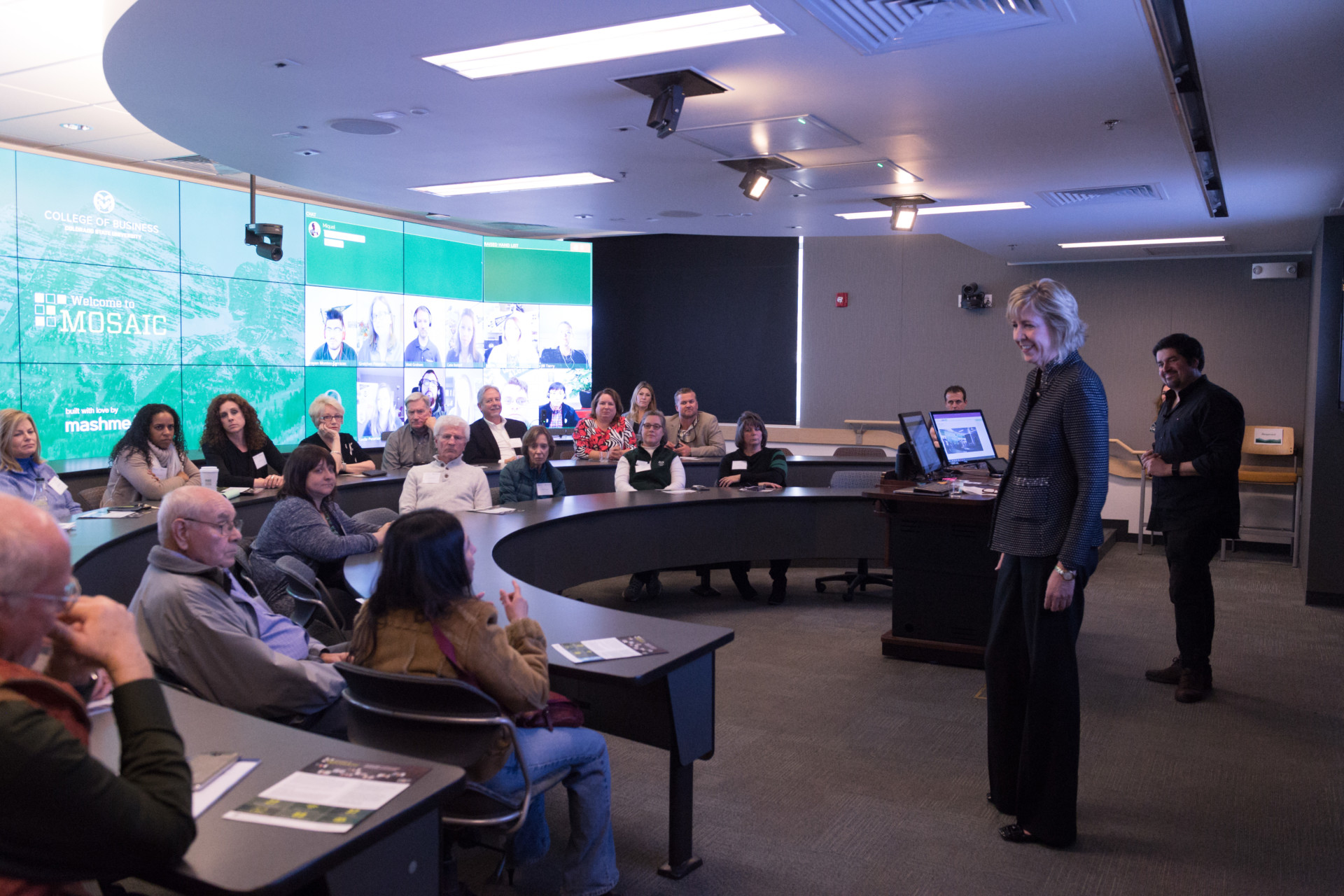
Colorado State University’s College of Business has installed 27 high-video screens to create "the classroom of the future". The screens are on the back wall of a classroom, which accommodates 37 students in the room and 88 remote on the screens. Some universities have gone further with a curved screens 360 degrees around the walls. However, I suggest these are a gimmick, a like flying cars, and are a future of the past.

HD screens and cameras are now not reasonably inexpensive, so it is tempting to fill classrooms with them. However, we should use the technology to overcome the limitations of physical classrooms, not perpetuate them.

If each student is displayed on screen life size, then this is only going to work for a small class, of less than one hundred students. For hundreds of students you would need a huge wall, and the instructor would not be able to clearly see any of them. Also the students in the room can't easily see the remote ones, even in a small room for a hundred students (in Colorado State's example, the screens are behind the students).  This would accurately emulate a large lecture theater, where the instructor can't see most of the students clearly, and students can't see each other, but is that a good thing?

Plan of Jeremy Bentham's
panopticon prison
,
drawn by Willey Reveley 1791.
From Wikipedia
In the modern classroom we don't want students passively sitting listening to the lecturer. We want students talking to each other. Building an electronic version of Bentham's panopticon, with the all-seeing teacher in the middle, and each student isolated, is not the way to do this.

The obvious solution is not to try to mimic the bad features of a physical classroom. Rather than dozens of screens, just have one on each wall, with the image of whoever is speaking enlarged, and everyone else reduced to thumbnails. This is what readily available, cheap or free, videoconferencing software already does. It is what most of the students in  “Room of the Future” see anyway, as they do not have a wall of screens at home.

Saturday, October 19, 2019

Blending Soft Skills for University Graduates

Wall mounted LCD screens and desks on wheels at ANU Marie Reay Teaching Centre
Wall mounted LCD screens
& desks on wheels at
ANU Marie Reay Teaching Centre
On 20 November I am speaking at the ANU TELFest technology-enhanced learning conference, on How to blend and flip a course for a flatpack classroom. This is for ANU staff, but I would be happy to speak on this elsewhere. In particular I will be in Sydney 28 to 29 October, and Perth on Wednesday 13 November, if anyone would like to provide a venue and an audience.

Wednesday, August 14, 2019

Learning to Reflect Module Version 2.0

I have updated my "Learning to Reflect" learning module for the ANU TechLauncher program this semester. The students are guided in how to prepare a job application. In the process they learn long term professional skills to identify their development needs, how they will acquire these and to reflect on what they have learned. The materials are available under a creative commons license for modification and reuse.

Introduction


The notes and videos contain content intended for instructors, as well as students, to be used in conjunction with online exercises, and face-to-face workshops. Students will be prompted by the Moodle Learning Management System, as to which parts to read, and when to read them.


1. Learn


In this first of two parts, you will investigate what you need to learn for your project, and long term for your career. In scope here, are both technical skills and also professional and teamwork skills. The aim is to prepare you to be a professional in your field, which includes the ability to take charge and responsibility for your future professional development.


2. Report and reflect


In this second and last part, you will reflect on what you have learned. The assignment task is to select a real position to prepare an application cover letter for, and revise the responses to selection criteria prepared in assignment 1.


Appendixes

Tuesday, August 6, 2019

Learning to Reflect Videos


Having revised the "Learning to Reflect" module notes for ANU TechLauncher students, it was time to revise the video. This is a time-consuming and exacting process, even for someone with training in video production.

Last semester I produced this by first making a slideshow presentation, which was also used live in the classroom. I prepared a script based on what was in the module notes, rearranged to match the sequence in the video. I then turned each slide into an image, and the script into synthetic speech. The slides and audio were then imported into a video editing package and timed to match the audio. The results were not perfect, but like Samuel Johnson's piano playing dog: "It's not done well; but you are surprised to find it done at all."  ;-)

This time I decided to try Content Samurai, after it was demonstrated at PitchEd NSW. This is a web based tool which takes a script, and searches for suitable video clips, or still images,  based on the key phrases. The service will then turn the script into synthetic speech timed to the video. This process works remarkably well. The Australian accented male voice provided is much better than those I have used previously. I did have to slow down the narration to 80% of full speed, and lower the volume of the background music to 5%.

After some experimentation I found I could set the system to add a new scene for each paragraph in the script. I could then hide the text, otherwise it would put it as a caption on screen. Also I could upload my slides in place of some of the auto suggested clips. This way my slides are interspersed with the suggested filler scenes.

Here is what the video looks like generated by automatically, with the defaults (video selected from keywords, scene transitions, animated text). This version was not usable:


I then changed the settings, to use only still images, and have one per paragraph, with no animation, or scene transitions:


One problem was that rendering was very slow (but video rendering is always slow). I found it could be faster by using still images, rather than video clips. The rendering took about six minutes for a six minute video. Also I created a plain black template for the slides, with no shaded pattern.

One option I would like is to reduce the bit-rate of the audio. For an educational video you need only low quality mono sound.

One tip is to set your slide maker (I use LibreOffice) for 16:9 format slides, to match a modern widescreen TV. Then generate the slides images at the resolution required. Full HD TV is 1,920x1,080. Content Samurai produced the lower resolution 1,280x720HD TV format typically used for broadcast TV, but down sampled my higher resolution slides very cleanly.

I could not find a way to prepare closed captions within Content Samurai, so I uploaded the video to YouTube, and then downloaded the VTT file it produced. I then uploaded this to the Moodle website, for the students.

Thursday, June 27, 2019

Learning to Reflect Course Module Worked


This is the tenth of a series of posts, on how to provide students with help when preparing a reflective portfolio. A class of 78 graduate computing students completed the module, as part of ANU Techlauncher. The flipped, blended, peer assessed approach worked well, and produced outcomes comparable to conventional lectures with instructor assessed assignments. A copy of the updated course notes are available. I can also provide a Moodle backup file including all course materials, and quiz questions, to instructors.

ANU Marie Reay
Teaching Centre
In 2008 I decided to stop using lectures as part of university courses. I then spent 2009 to 2018 designing and delivering purely online courses. In February 2019 the Australian National University unveiled the Marie Reay Teaching Centre, a flexible teaching building. I was able to use the building to try out the approach of an online course supplemented with face to face workshops. This I suggest could be generally applied in higher education. I have submitted a paper on this to an international computer education conference.

Friday, April 5, 2019

Audio Slideshow for Job Application Reflection Module


This is the ninth of a series of posts , on how to provide students with help when preparing a reflective portfolio. This is an audio slideshow. The slides are based on the course notes and the audio is computer generated.

This is intended to be a demonstration of how to produce multi-media for education, quickly, and easily. The slides were produced using LibreOffice "Impress" (a free alternative to Microsoft Powerpoint). To generate slides suitable for HDTV, the presentation was exported as PNG images at 1280×720 pixels. These slides were copied into the KDEinLive digital video package, and adjusted to fit with the audio commentary. The video was rendered as 720p MPEG 4,  at 200 kbps, 24 frames per second, with 64 kbps audio.

The computer generated audio is monotonous, and the text based slides not very interesting. However, this is a good start before trying anything more ambitious. Also students are not undertaking study to be entertained, but to be educated.

ps: This is for students of  ANU Tech Launcher.

Thursday, April 4, 2019

Audio Slideshow for Job Application Learning Module


This is the eighth of a series of posts , on how to provide students with help when preparing a reflective portfolio. This is specifically for students of  ANU Tech Launcher.


Mazen Al-Ismail
Previously I provided an audio podcast for part 1 "learn". However, research by Ismail (2018) suggests some students prefer audio with slides. So I have added slides to the audio. The student can still listen to the audio, without looking at the slides, which some prefer. This is easier to create and maintain than separate video and audio versions.

Tuesday, March 12, 2019

How to Blend and Flip a Course for a Flatpack Classroom

Next Friday, 15 March I will be speaking on "Blend, Flip, and Back to the Classroom". So I thought I should collect my thoughts on what to say. Here are some note, so far:

In 2008 I ended my last lecture for the year at ANU by announcing it would be my last lecture, ever. Having become disillusioned with the lecture format, I have been teaching online for the last ten years, with an award winning course offered by three institutions, in Australia and North America. During that time I looked at alternative classroom designs in Australia and around the world.

In February 2019 the Australian National University unveiled the Marie Reay Teaching Centre, a flexible teaching building. So this year I am going back to the classroom, to apply what I have learned, with a blend of online and classroom teaching in the new building. This is intended to be a model for how academics can easily convert conventional courses to new interactive ways of learning, and allow each student to choose the blend of online and classroom learning to suit their needs.

Overview of the Learning Module


I produced slides, and a video for the revised learning module, on how to provide students with help when preparing a reflective portfolio. This is for students of  ANU Tech Launcher, but intendeds to be able to be used more widely. The module has two parts, with the same format: read the notes, do an online quiz, participate in an on-line forum with peer assessment, then a face-to-face workshop, lastly do an assignment with peer feedback.

New Flexible Teaching Spaces at ANU

ANU Marie Reay Teaching Centre
The Marie Reay Teaching Centre opened at ANU 25 March, along with the Culture & events building opposite, both by Architects BVN. These buildings have flexible teaching spaces, but flexible in different ways. The culture and events building has a 500-seat auditorium, and a 200 seat flexible space. Both of these have tiered lecture theater style seating, but which retracts electrically, providing large flat floor spaces, with high ceilings.

In contrast, the Marie Reay Teaching Centre has only flat floor classrooms, for 30, 60, or 120 students. The flexibility here is provided by retractable walls, furniture on wheels, and electronic screens on multiple walls.

147 seat seminar room,
ANU Sciences Teaching Building


This approach of one building with lecture theaters, and one with flat floor classrooms, differs from attempts to combine the features of the two. As an example, the ANU Sciences Teaching Building has a 147 seat tiered seminar room. The room has wide tiers with fixed tables for groups of seven students. This is designed so students can watch a presentation at the front of the room, and then discuss it in a group, around their table. However, the tables take a lot of space and are fixed in place. Display screens on the tables block some of the view.

In contrast, the ANU Kambri complex has two buildings with specialized seating for specific pedagogy. The ANU Cultural Centre Building has high density tiered theater fixed seating for lectures. Opposite is the Marie Reay Teaching Centre with low density flat floor movable seating and tables for group work. This has the advantage that both format rooms can be used simultaneously. and offer a greater overall seating capacity, than would general purpose lecture/group rooms.
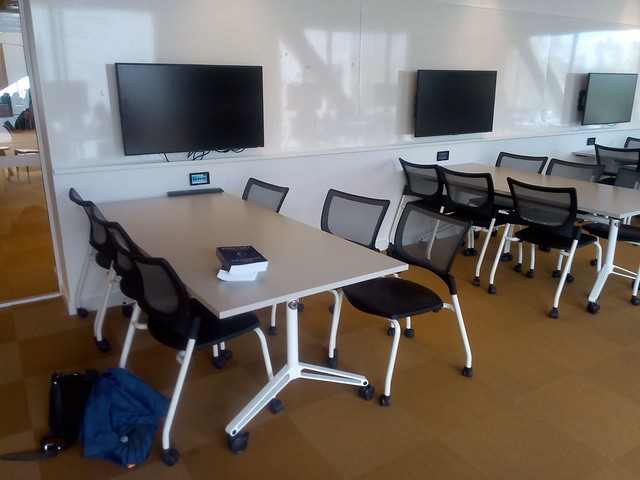
Wall mounted LCD screens and desks on wheels at ANU Marie Reay Teaching Centre
Wall mounted LCD screens
& desks on wheels at
ANU Marie Reay Teaching Centre
While the tables in the Marie Reay Teaching Centre are on wheels, one room (4.02) has five electronic screens on each side wall, spaced to allow each of five desks to have a screen (for a total of sixty students). This overcomes the problem of the desks becoming immovable, when computer screen are installed on them.

Students doing a Lego Serious Play exercise at the Australian National University in Canberra
Screen of Wheels, in use at the
ANU Barry Drive classrooms,
for ANU TechLauncher group activity
Other rooms have two projection screens for presentations. I have suggested these be supplemented with screens on wheels, which can be positioned for group work, or to display what is on the main screens. Such screens on wheels have been used at the ANU Barry Drive classrooms for an ANU TechLauncher group activity.

Top Down Course Design

My approach to course design reflects the limited flexibility of the new buildings. Flexibility is provided, but not at the expense of efficiency.

The learning is designed top down: start with the learning objectives, or externally set requirements. These set, in broad terms, the knowledge and skills the student must have on completion of the course.  Often these objectives are not provided to the educational designer, or are so vague they are of little use, so they have to be found, or invented.

For the Reflective Learning module, I first tried adapting skills definitions from the Skills Framework for the Information Age:
"Upon completion of this module, students will be able to:
  1. Determine their own learning needs and possible sources, to develop individual skills for a project and for their career development.
  2. Identify appropriate accreditation and qualification paths. 
  3. Manage the learning, and evaluate its effectiveness through through reflection."
 From the skill "Learning and Development" (ETMG), Level 6, SFIA, Version 7, 2017. As used in "Learning to Reflect" (Version 0.1), February 4, 2019.
SFIA is used by the Australian Computer Society for accreditation of Australian university degrees, and by some employers in defining jobs. It is useful to have course objectives aligned with SFIA, to make accreditation quicker, and so graduates can easily show employers they have required skills.

However, as I writing a module for use in an existing course, and that course was not aligned with SFIA, this approach did not work. In a later draft I replaced the SFIA objectives, with ones from the course definition:
"The module is aligned with two of the outcomes for the course:
3. 'learn any specific technical skills required by their topic, and apply them to project work.
4. apply and deepen skills in oral and written communication, and apply these in a project context.'
From Computing Project, Course COMP8715, ANU, 2019. URL https://programsandcourses.anu.edu.au/course/comp8715" as cited in "Introduction", of Learning to Reflect, Version 1, February 13, 2019.

Aligning Assessment with Leaning

My usual approach is to continue the top down development, by providing one major assessment task for each learning objective. However, in this case the final assessment task was already set by the existing course the module. So I have to set other assessment around this.
The main issue the module was intended to address was the difficulty Masters of Computing students had with the large assessment task at the end of semester. The obvious solution was to break this assignment into pieces delivered in sequence. However, the same assessment task is undertaken by students in multiple courses, all of whom are in the same tutorial group with the same tutor. Having different versions of the assignment for different students would be confusing for tutors and students.

Chunky Blended Learning

Designing learning takes time. I started designing the learning module in late 2018. At that time I was not sure if the new classrooms would be completed for first semester 2019. Even the week before semester started in February 2019, there was construction equipment around the building. However, this was quickly cleared away and the building opened on time, with the classroom equipped.

However, in late 2018 I could not be certain everything would be ready. So I used a conservative approach to blended course design, using what  Fleck (2012) refers to as "chunky" blended learning:
'The term "blended learning" usually refers to a mix of conventional face-to-face elements combined with on-line elements. However, this is at too general a level for in depth analysis, while the term "blend" perhaps suggests too homogeneous a mix: in practice the mix is more "lumpy", more a chunky fruit salad than a blended smoothie. At one extreme it is becoming routine for campus-based virtual learning environments (VLEs) to be used to provide additional notes and materials supporting conventional lectures.'
From Fleck (2012).
 The design is essentially a distance education course, with face-to-face workshops added. The learning management system (LMS), in this case Moodle (part of ANU's Wattle system) is used for providing students with course notes, videos, podcasts and other materials. The LMS is also used for routine announcements to the class, and individual communication with students. Small assessment tasks (quizzes and forum posts) are provided via Moodle's quiz and forum modules. Assignments are similarly done using the workshop module of Moodle.
As it was not clear what classroom would be available, the workshop design was kept general, and drawing on the preceding online activities.
  1. Announcements: General announcements while students set up the room.
  2. General Questions: Students can ask for clarification on administrative, content and assessment questions. Groups first discuss the question and if they are not  sure of the answer it can be put to the whole room.
  3. Forum Questions: Discuss your answers to this week's forum questions.
  4. Assignment Master Class: Bring along your draft assignment, ask for feedback from your group. Be prepared to put it up on the big screen for group feedback.
  5. Wrap-up: Any concluding remarks by students and instructors.
The same  format is used for all workshops, so that staff and students can become familiar with it. This avoids limited class time being taken up with explanations of complex exercise formats.

Chunky Online Learning

As well as the blended and online learning being chunky, the online component is in large chunks. The student is provided with a package of material for two weeks. This has notes, suggested readings, a quiz, discussion questions, workshop, and assignments. While the student is expected to undertake the work in this order, exactly what they do when in the two weeks is left largely to the individual.

This contrasts with tightly scripted online learning modules which give the student a few paragraphs to read and perhaps a video, then an automatically marked question they have to answer before proceeding to the next item. Such packages require considerable design and testing if they are not to hold up and frustrate students. Also these tend to require a high speed reliable network connection to function. In contrast the chunky approach allows students to download material, and use it offline.

References


Fleck, J. (2012). Blended learning and learning communities: opportunities and challenges. Journal of Management Development, 31(4), 398-411. http://dx.doi.org.virtual.anu.edu.au/10.1108/02621711211219059 
Worthington, T. My Last Lecture, Net Traveller (Blog), August 20, 2008. URL https://blog.tomw.net.au/2008/08/my-last-lecture.html 
Worthington, T., "A Green computing professional education course online: Designing and delivering a course in ICT sustainability using Internet and eBooks," Computer Science & Education (ICCSE), 2012 7th International Conference on , vol., no., pp.263,266, 14-17 July 2012 URL: http://dx.doi.org/10.1109/ICCSE.2012.6295070 Preprint available at: http://hdl.handle.net/1885/9013 
Worthington, T. Learning to Teach in the New ANU Teaching Building, Higher Education Whisperer (Blog), February 11, 2019. URL https://blog.highereducationwhisperer.com/2019/02/learning-to-teach-in-new-anu-teaching.html 
Worthington, T. Helping Computing Students Prepare a Reflective Portfolio: Parts 1 to 7, Higher Education Whisperer (Blog), November 28, 2018 to February 13, 2019. URL https://blog.highereducationwhisperer.com/search/label/Reflective%20Portfolio%20Course

Wednesday, February 13, 2019

Shorter Learning Module for Teaching Students to a Write Job Application

This is the seventh of a series of posts , with a revised learning module, on how to provide students with help when preparing a reflective portfolio. This is specifically for students of  ANU Tech Launcher

Previously I provided three parts (1. Plan, 2. Learn, & 3. Report and reflect). However, that was far more work than a student could do in the available four hours study. So I have deleted part 1. Some of the content on learning has been moved to the next part "Learn", but the rest has been deleted. Also I have made all readings "suggested", not required. The SFIA learning objectives have been replaced with two from ANU Techlauncher (which the module is part of).

Also I have added a video with commentary to introduce the module, and audio podcasts for parts 1 & 2. The audio is text-to-speech, using Animaker's Australian English voice "Russell". I am not that good a speaker, and it would take a long of time to come up with a good narration. As it is, I can copy the notes to a text file. I then insert pauses at the ends of paragraphs, and replace abbreviations (such as "ANU", which would be pronounced as "Arrnoo"). I can simply edit the text and regenerate the audio, in a few minutes.

Table of contents

Introduction
1. Learn
2. Report and reflect

Appendixes