Showing posts with label m-learning. Show all posts

Monday, August 19, 2019

Digital Learning For Behavioural Change

I was skeptical, and slightly worried, by the title of Haymarket HQ's talk last Friday: "The Future of Digital Learning to Drive Behavioural Change" by So-Young Kang, Founder of Gnowbe. Haymarket HQ is a start-up center in Sydney's Chinatown, specializing in helping Australian businesses expand into China. But the behavioral change So-Young talked about was not some sort of Orwellian brainwashing, but helping people get ready for new jobs.

So-Young emphasized a mobile first approach to online learning, rather than mobile responsive. The latter is for on-line delivery to desktop computers, but uses features in web technology to ensure the display is adjusted if the student has a mobile device. With real mobile-first, the screen display, the content, and the course, is designed with mobile devices in mind. This requires much smaller units of learning.

With my course design I started with desktop orientation, about ten years ago, and started incorporating more mobile features using responsive design over the last five years. I now assume the student will study the material on a mobile device, do the quizzes and forum interaction, but still use a desktop computer for the major written assignments.

So-Young talked of both businesses and universities using Gnowbe products for staff and students. What was most interesting was using this for people skills. Academics and teachers could look at some of these techniques. What is yet to be explored in detail is how this will fit with conventional post-secondary learning. Are VET and university qualifications to be replaced by micro-learning? I suspect not, but it may be supplemented, or supported by this.

Monday, January 21, 2019

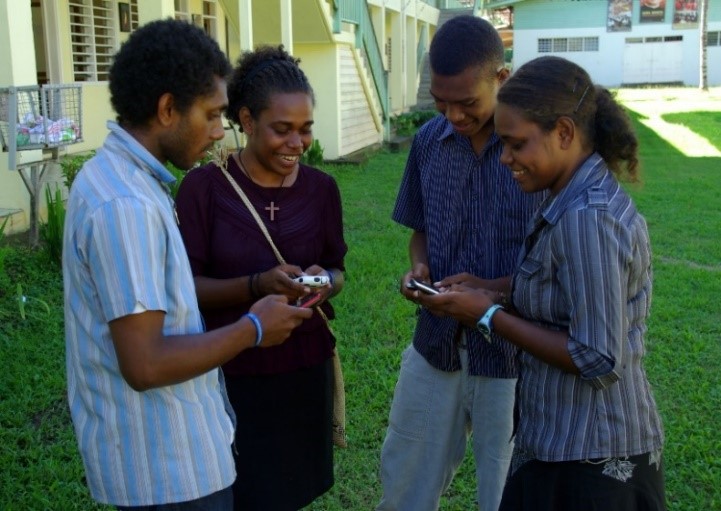
Education for the Indo-Pacific Does Not Need 5G Mobile Communications


Exploring the mobile internet,
Solomon Islands,
Photo: Irene Scott/DFAT.
The short paper I presented on "Blended Learning for the Indo-Pacific" at the International Conference on Teaching, Assessment, and Learning for Engineering (TALE) in Wollongong last December, has been published by IEEE. One curious addition to the paper is the keyword "5G mobile communication". The paper discusses using smarphones for education, but I never mention fifth generation mobile networks, nor do I think these are really necessary.

A 3G or 4G network connection is more than enough for a student. A 3G network provides tens of megabits per second and 4G hundreds. This is sufficient for a student to watch videos, and upload their own, as well as take part in live video conferences. In practice students may have much more limited access, due to cost and logistics, so I design online courses where the student can download large materials infrequently, and then use a much slower connection for interaction.

An example of where this may be an issue is the Solomon Islands. The Australian Government is funding a fibre optic cable to the Solomon Islands and the Department of Foreign Affairs and Trade has asked for ideas how this could help young people with skills and education. I have submitted a proposal "Micro-credentials by Mobile Phone for the Solomon Islands", which is based on my TALE paper.

The problem in the Solomon Islands will be getting the data from the point where the fibre optic cable lands, to where the population is. It is likely the the capital, Honiara on Guadalcanal, will be connected, but not all of the other populated islands.

To address this issue I design online courses which do not require a high speed connection. The student can download all the materials required at the start of the course from a cyber cafe (or be sent a data file in the post). They then only need a slow connection to read announcements and participate in text based forums. Live interactive video is nice to have, but not at the cost of excluding many students. If a 2G GPRS connection is available, providing about 100 kbps, the student can take part in Webinars with audio and slides.

Where video and audio are not available, the course designer and instructor have to make sure that the student gets a sense of human connection, through the text based forums. This is not ideal, but can be made to work.

Paper

T. Worthington, "Blended Learning for the Indo-Pacific," 2018 IEEE International Conference on Teaching, Assessment, and Learning for Engineering (TALE), Wollongong, Australia, 2018, pp. 861-865. doi: 10.1109/TALE.2018.8615183 URL https://doi.org/10.1109/TALE.2018.8615183

Keywords: 5G mobile communication; Australia; Conferences; Education; training; employment; educational institutions; teaching; Australian educational system; assessment; cognitive learning theory; social learning theory; Indo-Pacific; blockchain; micro-credentials


Friday, November 30, 2018

Why Students Drop Out of Online Professional Development Courses

The latest edition of IRRODL, has a paper by Luz, Rolando, Salvador and Sousa (2018) looking at why just over half of 3,026 Brazilian teachers did not complete their online Professional Development (PD) course. The authors conclude that this is due to teacher workload and technical difficulties accessing the courses. The design of the courses, gender and age of the students did not influence completion rates.

The authors suggest shorter courses would not reduce dropout rates, as these were similar for 12 week and 16-week courses. However, Figure 1 shows a steady dropout rate each week of a course (apart from a spike where there is a final paper). Making courses much shorter, should therefore improve completion. I have proposed dividing a typical 12 week university course into three "micro-credentials", and that these could be used for students in the Solomon Islands (formal paper in press).

Luz, Rolando, Salvador and  Sousa noted technical difficulties with computers, the internet, and course platform, as the most frequent reasons reported by students for pulling out. Lack of access due to computer problems, I suggest can be addressed by use of smart phones. Students can use the smart phone for readings, videos, and small interactive exercises, to keep them engaged.

Major assignments may need a more capable device than a smart phone. However, larger smart phones now have screens approaching the size of a small tablet computer, and can have an external keyboard connected. An external monitor can be connected to some smart phones, to convert it into a desktop computer.

Slow Internet access can be addressed by more efficient course content design, and packaging. Students could download large course components to their phone when they have high speed access to the Internet (for example free WiFi in cafes), and then read this material offline. Small frequent interactions, such as participating in a discussion forum, could be done over a slower, low speed connection.

Reference


Luz, M., Rolando, L., Salvador, D., & Sousa, A. (2018). Characterization of the Reasons Why Brazilian Science Teachers Drop Out of Online Professional Development Courses. The International Review Of Research In Open And Distributed Learning, 19(5). doi:http://dx.doi.org/10.19173/irrodl.v19i5.3642

Worthington, T. (in press). Blended Learning for the Indo-Pacific. In Teaching, Assessment, and Learning for Engineering (TALE), 2018 IEEE 7th International Conference on. IEEE. url http://hdl.handle.net/1885/148733

ps: I suggest IRRODL (and other AU publications) need to offer secure HTTPS web connections. IRRODL is giving away open access content, and so doesn't need a high security connection. However, insecure websites are now being routinely treated with suspicion by web browsers and other software. Recently I made the change with my own website. It was quick, easy, and free.

Saturday, November 24, 2018

Micro-credentials by Mobile Phone for the Solomon Islands


Exploring the mobile internet,
Solomon Islands,
Photo: Irene Scott/DFAT.
The Australian Government is paying for a fibre optic cable to the Solomon Islands. With the Solomon Islands Technology for Development Challenge, the Department of Foreign Affairs and Trade has asked for ideas how this could help young people with skills and education. The winning idea will receive up to $250,000 AUD for implementation.

I have entered the Challenge with "Micro-credentials by Mobile Phone", to develop courses delivered via smart phones, which provide a vocationally relevant credential, within months, rather than taking years. The winning idea will receive up to $250,000 AUD for implementation, as part of the Australia’s Cyber Cooperation Program. I outlined my proposal to the Australian Computer Society's Canberra conference a few months ago National IT Conference in Colombo in October and will be presenting a short paper on it at the 7th International Conference on Teaching, Assessment, and Learning for Engineering, in Woolongong, 6 December 2018.

Micro-credentials by Mobile Phone

Explain your idea

Provide short courses to students via mobile phones. To provide maximum benefit, the courses would provide a micro-credential, as well as industry certification, and credit towards more advanced qualifications. The courses would be designed and delivered jointly, by institutions acrossExploring the mobile internet,
Solomon Islands,
Photo: Irene Scott/DFAT.Exploring the mobile internet,
Solomon Islands,
Photo: Irene Scott/DFAT. the Indo-Pacific, to mixed classes of students from the region.

Who will benefit from your idea?

Courses will be delivered to those with at least a primary school education. The course content will be designed to work on low cost phones now available and with limited network access. Initially courses would focus on teaching teachers in how to use the technology for teaching. Courses would connect students from across the Indo-Pacific, reducing isolation. Micro-Credentials would be achievable with a few weeks study, unlike conventional qualifications, which take months or years.

How will your idea have a development impact?

Providing training and qualifications will improve the prospects for employment of youth employment. The use of short mobile courses will provide education to those who could not be catered for in conventional courses.

How developed is your idea?

Research & Early Testing
A short formal paper on this has been accepted for thExploring the mobile internet,
Solomon Islands,
Photo: Irene Scott/DFAT.e 2018 IEEE 7th International Conference on Teaching, Assessment, and Learning for Engineering (TALE), in Woolongong, 4-7 December 2018.  http://www.tomw.net.au/technology/it/indo_pacific_blended_learning/
A project at the ANU has developed prototype software to deliver courses: https://cecs.anu.edu.au/research/student-research-projects/async-sync-learning-system

Tell us more about you

I am an independent educational technology consultant, and an Honorary Senior Lecturer in the Research School of Computer Science at the Australian National University. I am a Certified Professional member of the Australian Computer Society, as well as a Fellow of the Higher Education Academy, and have a a Master of Education in Distance Education  and am the author of "Digital Teaching In Higher Education".
My plan is to make use of some of the 300 ANU Techlauncher students to build software, and education students to build content. I am also looking to work with academic, and business, partners.
Some of the other ideas proposed so far are: 

Monday, August 21, 2017

Peace Through Superior Education: Notes

Notes for the seminar "Peace Through Superior Education", 2pm, 22 August, ANU. All welcome, free but please book.

About the Peace Through Superior Education proposal: 


'Many of the world’s most intractable problems occur on Australia's doorstep: where the trade-routes of the world's emerging economies meet. The Australian National University (ANU) was created by the Australian Parliament to meet these challenges in this region. The ANU does this by bringing together the best and brightest young people of the region to learn and to cooperate. Can this can be extended through the use of digital networks, particularly mobile devices, with an order of magnitude increase in the number of students? Can we use digital networks to engage, educate and influence the behaviors of the indo- pacific publics? How can we best do that? To answer these questions a longitudinal exploration into the transformative learning will be conducted. In this way can we can address the United Nations Sustainable Development Goals (SDGs): "... end poverty ... protect the planet ... ensure prosperity for all ... foster peaceful, just and inclusive societies ... based on a spirit of strengthened global solidarity ...".'


Peace Through Superior Education

M-learning for the indo-pacific to address radicalization, climate change, food and energy security.

 Chris Barrie
Adam Broinowski
Catherine Settle
Tom Worthington

A Grand Challenges Proposal


   ANU Grand Challenges Scheme

"... identify a problem or challenge that research can address. What's unique about the program is the way it seeks to bring people together from all across the University to bring new perspectives to a major challenge confronting society."


   Scheme Stages

  1. Call for Ideas: 3 minute videos (ended 24 July)
  2. Assembly of Teams: two-page proposal by 28 August
  3. Selection of Finalists: by 8 September
  4. Selection of the 2018 ANU Grand Challenge: TBA
  5. Full Business Case: TBA
Process is similar to the Innovation ACT completion.


First stage: three minute videos

Some of the entries:
  1. Peace Through Superior Education 
  2. Zero-Carbon Energy for the Asia-Pacific
  3. Grand Challenge of Negative Emissions
More detailed proposal due 28 August.

Others entries and details at the ANU Grand Challenges Portal (ANU access only).
 

Top 20 Words in the Entries

health, science, change, social, policy, law, sustainability, knowledge, climate, energy, food, environmental, education, economics, politics, sciences, computer, Futures, complex, public


The Indo-Pacific

Many of the world’s most intractable problems occur on Australia's doorstep: where the trade-routes of the world's emerging economies meet.  
Map by Eric Gaba (Sting) CC BY-SA 4.0, via Wikimedia Commons


South China Sea

By Todd Frantom [Public domain],
via Wikimedia Commons
"A U.S. guided-missile destroyer came within 12 nautical miles of the contested Chinese installation built on an artificial island off the coast of the Philippines on Thursday ..." Sam LaGrone,US Naval Institute

"... U.S. guided-missile destroyer collided with a chemical tanker in the South China Sea ..." Sam LaGrone, US Naval Institute  

Australian_National_University Arms
The Australian National University (ANU) was created by the Australian Parliament to meet the challenges in this region. 
 

John Dedman
"... the Government had decided to proceed with the establishment of an Australian National University ... Both in Australia and in the world at large, innumerable problems await solution if the future is to be made safe and the people placed in a position to enjoy the fruits of the developments in science and in human relationships which have taken place ... We have also greatly increased responsibility to shoulder in relation to other people, particularly to those with whom we are associated as a' Pacific power. ..."
From ANU Bill Second Reading Speech, Mr. John Dedman, Minister for Post-war Reconstruction, Australian Parliament, 19 June 1946


The Colombo Plan

  • Cooperative Economic and Social Development in Asia and the Pacific
  • Educational and scientific aid from Western countries
  • Multilateral 1950s cold war soft diplomacy
  • Included Australian government scholarships to study in Australia
  • Mostly on-campus face-to-face classes and research, at existing universities
  • Six “cinema vans” for Indonesian vocational training (early mobile educational multimedia).
See: D. Oakman, "Facing Asia: a history of the Colombo Plan", ANU E Press, 2010.


ANU Education


ANU Student Ambassadors

The ANU brings together the best and brightest young people of the region to learn and to cooperate. 


ANU Education in the Region

Apia Harbor Sunset,
Worthington, 2005


Pictograph of an e-book by Carlos Sarmento from the Noun Project (CC BY 3.0 US)
Can this can be extended through the use of digital networks, particularly mobile devices, with an order of magnitude increase in the number of students? 
Pictographs by Carlos Sarmento from the Noun Project (CC BY 3.0 US). 


Responsive Web Design

Green course home page in landscape mode on a mobile device
Desktop Computer
Green course home page in landscape mode on a mobile device
Smart Phone
No attendance is required. All materials and assessment are on-line.

Same e-learning content for desktops and low bandwidth smart phones.
Example from "ICT Sustainability" COMP7310, ANU.


Pictograph of issues by Carlos Sarmento from the Noun Project (CC BY 3.0 US)
To answer these questions a longitudinal exploration into the transformative learning will be conducted. 
Pictographs by Carlos Sarmento from the Noun Project (CC BY 3.0 US). 

UN Sustainable Development Goals

"... end poverty ... protect the planet ... ensure prosperity for all ... foster peaceful, just and inclusive societies ... based on a spirit of strengthened global solidarity ..."
UN General Assembly resolution 70/17, Transforming our world: the 2030 Agenda for Sustainable Development, A /RES/70/1 (21 October 2015).

Field/s of research


Pedagogy, digital networking, climate change adaption, ethnopolitics, energy efficiency

Interested parties

Adam BroinowskiChris Barrie

Tom WorthingtonCatherine Settle

References

  • UN General Assembly resolution 70/17, Transforming our world: the 2030 Agenda for Sustainable Development, A /RES/70/1 (21 October 2015).
  • Worthington, T. (2014, August 23). Chinese and Australian Students Learning to Work Together Online: Proposal to Expand the New Colombo Plan to the Online Environment. Paper to be presented at the 9th International Conference on Computer Science & Education (ICCSE). Vancouver, Canada. http://dx.doi.org/10.1109/ICCSE.2014.6926448
  • Worthington, T. (2017). Digital teaching in higher education : designing e-learning for international students of technology, innovation and the environment. Belconnen, A.C.T. TomW Communications Pty Ltd. http://www.tomw.net.au/digital_teaching/ 

Monday, August 14, 2017

Seminar on ANU Grand Challenge: Peace through superior education

I will be presenting a seminar on the ANU Grand Challenge: Peace through superior education, 22 August 2017 at the Australian National University in Canberra. All welcome, free but please book.
The ANU Grand Challenges Scheme aims to "...bring people together from all across the University to bring new perspectives to a major challenge confronting society". Nine of the proposes relate to education through the use of technology. This seminar discusses one such proposal, for delivery of education on-line in the indo-pacific region from ANU.

Saturday, August 12, 2017

Designing Professional e-Learning

The Australian Computer Society Canberra Conference needed an extra speaker next Tuesday. So I am filling a 2:20pm slot with "Designing Professional e-Learning". It is an opportune time of this as ANU has just announced a "major expansion of engineering and computer science".

Designing Professional e-Learning

Speaker: Tom Worthington, MEd, FACS CP, Honorary Senior Lecturer, Research School of Computer Science, Australian National University

Award winning e-learning designer Tom Worthington will discuss how to equip professionals for the technology challenges of the 21st Century. He will detail how to provide formal postgraduate education to students in their workplaces via mobile devices. Tom will discuss his own experience as an international student using an e-portfolio to provide evidence of skills.

Speaker

Tom Worthington is an independent consulting Certified Computer Professional and an Honorary Senior Lecturer in the Research School of Computer Science at the ANU. He writes on education issues as "The Higher Education Whisperer" and more generally as "The Net Traveler". Tom is leading an ANU Grand Challenge team to provide m-learning to 200,000 students across the indo-pacific region.
 

Wednesday, August 2, 2017

Peace Through Superior Education

Peace Through Superior Education is an entry in the Australian National University's ANU Grand Challenges Scheme. This entry proposes to test the use of  mobile learning to connect people across our region to address radicalization, climate change, food and energy security.

Other ANU Grand Challenge entries include: Zero-Carbon Energy for the Asia-Pacific and the Grand Challenge of Negative Emissions.  ANU researchers and students interested in working on these can access the ANU Grand Challenges Portal. Non-ANU researchers can contact the project personnel to express interest in participating.

About the Peace Through Superior Education proposal: 


'Many of the world’s most intractable problems occur on Australia's doorstep: where the trade-routes of the world's emerging economies meet. The Australian National University (ANU) was created by the Australian Parliament to meet these challenges in this region. The ANU does this by bringing together the best and brightest young people of the region to learn and to cooperate. Can this can be extended through the use of digital networks, particularly mobile devices, with an order of magnitude increase in the number of students? Can we use digital networks to engage, educate and influence the behaviors of the indo- pacific publics? How can we best do that? To answer these questions a longitudinal exploration into the transformative learning will be conducted. In this way can we can address the United Nations Sustainable Development Goals (SDGs): "... end poverty ... protect the planet ... ensure prosperity for all ... foster peaceful, just and inclusive societies ... based on a spirit of strengthened global solidarity ...".'


Peace Through Superior Education

M-learning for the indo-pacific to address radicalization, climate change, food and energy security.

 Chris Barrie
Adam Broinowski
Catherine Settle
Tom Worthington

A Grand Challenges Proposal


The Indo-Pacific

Many of the world’s most intractable problems occur on Australia's doorstep: where the trade-routes of the world's emerging economies meet.  
Map by Eric Gaba (Sting) CC BY-SA 4.0, via Wikimedia Commons


Australian_National_University Arms
The Australian National University (ANU) was created by the Australian Parliament to meet the challenges in this region. 

ANU Student Ambassadors

The ANU brings together the best and brightest young people of the region to learn and to cooperate. 


Pictograph of an e-book by Carlos Sarmento from the Noun Project (CC BY 3.0 US)
Can this can be extended through the use of digital networks, particularly mobile devices, with an order of magnitude increase in the number of students? 
Pictographs by Carlos Sarmento from the Noun Project (CC BY 3.0 US). 

Pictograph of issues by Carlos Sarmento from the Noun Project (CC BY 3.0 US)
To answer these questions a longitudinal exploration into the transformative learning will be conducted. 
Pictographs by Carlos Sarmento from the Noun Project (CC BY 3.0 US). 


UN Sustainable Development Goals
 "... end poverty ... protect the planet ... ensure prosperity for all ... foster peaceful, just and inclusive societies ... based on a spirit of strengthened global solidarity ..." 
UN General Assembly resolution 70/17, Transforming our world: the 2030 Agenda for Sustainable Development, A /RES/70/1 (21 October 2015).

Field/s of research


Pedagogy, digital networking, climate change adaption, ethnopolitics, energy efficiency

Interested parties

Adam BroinowskiChris Barrie

Tom WorthingtonCatherine Settle


References

  • UN General Assembly resolution 70/17, Transforming our world: the 2030 Agenda for Sustainable Development, A /RES/70/1 (21 October 2015).
  • Worthington, T. (2014, August 23). Chinese and Australian Students Learning to Work Together Online: Proposal to Expand the New Colombo Plan to the Online Environment. Paper to be presented at the 9th International Conference on Computer Science & Education (ICCSE). Vancouver, Canada. http://dx.doi.org/10.1109/ICCSE.2014.6926448
  • Worthington, T. (2017). Digital teaching in higher education : designing e-learning for international students of technology, innovation and the environment. Belconnen, A.C.T. TomW Communications Pty Ltd. http://www.tomw.net.au/digital_teaching/

Thursday, July 6, 2017

Mobile Learning with Totara and Moodle, ACS Canberra, 19 July

Matthew Burley, CEO of Sydney startup Mobile Learning, will speak on "m-Learning with Totara and Moodle", at the Australian Computer Society's ICT Educators forum, in Canberra, in the evening of 19 July 2017. Matthew is also available in Canberra that day for discussions with educators.

Wednesday, December 23, 2015

Mobile Devices for Tertiary Study by Remote Aboriginal and Torres Strait Islander Women

Townsend (2015) outlines his PhD research on mobile learning for Aboriginal and Torres Strait Islander female pre-service teachers in very remote Australian communities. He proposes mobile devices to counter the low completion rates for Initial Teacher Education (ITE) programs in South Australia (SA) Queensland (Qld). These programs have a  36% completion rate nationally, which itself is not good, but only 15% in remote communities. Townsend argues that mobile learning particularly suits this group of students who have a "collective or corporate understanding" and posits it will improve completion rates.
Townsend (2015) studied 64 students, but not all used mobile devices. I had difficulty working out from the paper exactly how many did.
Townsend (2015)  found that students want videos suitable for mobile devices of the on-campus lectures and seminars (apparently the students don't get all the materials in a format they can use). Also announcements should be sent to the students’ mobile devices.This appears to indicate a failing with the configuration of the  learning software used. The video lecture system and learning management system I use will, by default provide versions of videos and announcements for mobile devices.
The third student requirement reported by Townsend (2015) is non-technical:

"... give frequent personal praise, sympathy or emotional support as appropriate through the changing circumstances of a student's life directly to students’ mobile devices to ensure a student remains engaged in study".

How frequent the support is required is not stated. I provide each on-line student in the courses I teach an individual person message each week. I first positively comment on something the student did, before making suggestions for improvement.

However, this may not be common. In courses I have been a student of, it is rare for students to receive this level of attention, hearing from the tutor in person perhaps once a month. In some courses I have not received any personal message from the tutor at all over a three month course.

Townsend (2015)  points to the value of mobile learning in terms of place, time, and pace of study, with work, family commitments and health issues preventing students from attending a class in person, even when they are in proximity to a study center. He also details the benefits in terms of collaboration between students from e-learning (I have found this as a student).

While these benefits of m-learning apply to the community generally, but to a lesser degree. Those in an urban environment are not so far from a university campus and may have better access through a laptop or desktop computer than in a remote indigenous community. However, issues of family and cultural obligations, along with ill-health, can prevent access to conventional campuses and study.

Rather than treat very remote indigenous students as a special case and provide them with special programs, I suggest that tertiary studies should be, by default designed on the assumption the student will be remote and part time. It is well past the time when a student could be assumed to be full time on campus and not have any work, family or cultural obligations.

References

Townsend, P. (2015). Mobile Devices for Tertiary Study–Philosophy Meets Pragmatics for Remote Aboriginal and Torres Strait Islander Women. The Australian Journal of Indigenous Education, 1-11. http://journals.cambridge.org/abstract_S1326011115000265

Tuesday, December 8, 2015

Can M-learning Make for a Campus Experience, Off-campus?

Recently I was investigating the use of mobile learning (m-learning) for programs and workplace learning. My area of work concerns teaching ICT students in Australian postgraduate programs leading to professional certification. Such courses are increasingly delivered via blended and e-learning, using tools such as Moodle. However, one aspect of such programs which has limited support from on-line tools and remains an educational and administrative problem, is the workplace experience component required for professional certification of graduates.

M-leaning is a development of e-learning, which was built on the foundation of paper based distance education. This evolutionary approach, I suggest, could be applied to the supervision of ICT students in Australian postgraduate programs leading to professional certification. Students could undertake part, or all, of their education in the workplace, supervised face-to-face by professionals, with remote support from the university. This would overcome the visa restrictions on transnational students, which would otherwise limit their use of e-learning. By using a combination of work-place supervisors and m-learning, to make the learning experience personal, immediate and intimate, students could have an campus experience while off-campus. As well as improving the quality of education by situating it in the workplace, this will provide access to education which would be otherwise denied due to regulations concerning the use of online learning.

Developing bespoke m-learning tools was a high cost process. However, e-learning tools, such as Moodle and Mahara, now come by default with "responsive" web interfaces which adapt to work on mobile devices.

Wednesday, November 25, 2015

How do you evaluate an educational app?

To work out how to evaluate an educational app, my first step, as usual, was to search the scholarly literature. A search for “educational app evaluation” produced 199,000 results. This is a few too many to look at, so I limited the search to just this year (2015) and got a more manageable 11,400. This is still too many to read so I added “rubric” to the search, reduced it further to 1,740 results.

Weng, and Taber-Doughty (p. 56, 2015) prepared a three page rubric for evaluating iPad apps  for students with disabilities. Eight practitioners at schools in the US Midwest evaluated nine commercially available iPad apps designed for students with disabilities.

The criteria were rated on a three point  scale: Disagree, Neutral, Agree (or not applicable, uncertain).

Criteria

Quality of Feedback/Correction

  1. Feedback is accurate and clear
  2. Correction is accurate and clear
  3. Feedback doesn’t reinforce behavior or distract students

Quality of Design

  1. Layout is simple and clear
  2. Layout is consistent
  3. Easy to navigate
  4. No distracting features
  5. Speech is clear and easy to understand

Content

  1. Various levels of content difficulty are available
  2. Appropriate for the target developmental level
  3. Content is appropriate for the target area
  4. No unnecessary or unrelated information

Usability

  1. Students can use independently after set up
  2. Only minimal adult supervision is needed after training
  3. Constant adult supervision is needed

Ability to be individualized

  1. Able to individualize levels of difficulty
  2. Able to individualize content to meet a student’s need
  3. Able to individualize speed of speech
  4. Able to adjust size of pictures, fonts, etc.
  5. Multiple voices available for selection
  6. Able to choose modalities
The rubric produced mixed results with some criteria producing consistent results between evaluators and others not.
Campbell, Gunter and Braga (2015) used the Relevance Embedding Translation Adaptation Immersion & Naturalization (RETAIN) model to evaluate educational games. The RETAIN rubric was developed by Gunter, Kenny, and Vick (p. 524, 2008). The model has six criteria, each with four levels (0 to 3). The criteria are:
  1. relevance: to the learner’s life,
  2. embedding: the educational content is integrated with the game content,
  3. transfer: what is learned is applicable outside the game,
  4. adaptation: encourages active learning beyond the game scenario,
  5. immersion: player becomes involved in the game,
  6. naturalization:players learn to learn.
Having been through the 20 top results for 2015, I widened the search to include 2014, resulting in 3,370 results.

Green, Hechter, Tysinger and Chassereau (2014) developed the Mobile App Selection for Science (MASS) rubric for mobile apps  for 5th to 12th grade science, valuated with 24 Canadian teachers. One thing I have learned so far is that your mobile App evaluation rubric needs a snappy acronym, like MASS or RETAIN. ;-)

More seriously, MASS is based on the m-learning framework by Kearney,  Schuck, Burden and Aubusson (2012). This framework has three characteristics: Personalisation, Authenticity and Collaboration (further divided into sub-scales).
The MASS rubric has six criteria assessed at three levels (Green, Hechter, Tysinger & Chassereau, p. 70, 2014) :
  1. Accuracy of the  content,
  2. Relevance of Content,
  3. Sharing Findings (Student’s work can be exported as a document),
  4. Feedback to student,
  5. Scientific Inquiry and Practices: Allows for information gathering through observation,
  6. Navigation of application (interface design).
Having looked at five papers it is time to draw some general points. One is that evaluation of m-learning Apps might be divided into two sets of criteria: as a software application and as an educational experience. There are some general criteria for the evaluation of software, such as the accessibility of the interface for those with a disability.

Apps are a subset of software applications, but curiously none of the authors of these Apps rubrics appear to have looked to work on the evaluation of desktop educational applications to draw inspiration from. Given the size of the market for educational software and that it has been in existence for decades, there must be an extensive literature on this topic.

References

Campbell, L. O., Gunter, G., & Braga, J. (2015, March). Utilizing the RETAIN Model to Evaluate Mobile Learning Applications. In Society for Information Technology & Teacher Education International Conference (Vol. 2015, No. 1, pp. 8242-8246). Retrieved from http://webcache.googleusercontent.com/search?q=cache:lS7EOK9SQa8J:www.editlib.org/p/150079/proceeding_150079.pdf+&cd=3&hl=en&ct=clnk&gl=au

Green, L. S., Hechter, R. P., Tysinger, P. D., & Chassereau, K. D. (2014). Mobile app selection for 5th through 12th grade science: The development of the MASS rubric. Computers & Education, 75, 65-71.
Gunter, G. A., Kenny, R. F., & Vick, E. H. (2008). Taking educational games seriously: using the RETAIN model to design endogenous fantasy into standalone educational games. Educational Technology Research and Development, 56(5-6), 511-537.
Kearney, M., Schuck, S., Burden, K., & Aubusson, P. (2012). Viewing mobile learning from a pedagogical perspective. Research In Learning Technology, 20(1), 1-17. doi:10.3402/rlt.v20i0/14406
Weng, P. L., & Taber-Doughty, T. (2015). Developing an App Evaluation Rubric for Practitioners in Special Education. Journal of Special Education Technology, 30(1).

Turning Educational Web Pages into an App

I set up the WordPress blog "Mobalize" as a student exercise. This takes a minimalist approach, using the default design, which seems to be a responsive and looks okay on my smart phone's 4 inch screen. For content I tried to answer the question: "How do you evaluate an educational app?".

QR Code for AppTo build an App, I took the same minimalist approach. I saved a copy of my Wordpress blog post, zipped the resulting files, uploaded them to Adobe PhoneGap and generated an Android App called "Mobilize Education". The only tricky part was that I had to rename the web page "index.html". Phonegap asks for a config.xml file, as per the W3C widget specification, but this is not essential in this case, as the "App" is just a web page.

The files for the web pages are 194 kbytes when Zipped (654 kbytes uncompressed). The App is considerably larger at 1.1 Mbytes, but I expect this is for programs and as more content was added the overhead would be a smaller proportion.

It looks to me that it would be very easy to take content from a Moodle eBook, ePub, Kindle, SCORM or any of the other web based content formats and turn it into an App (these all consist of zipped web pages). Of course if you wanted a more interactive App, that would take more work.


ps: The App is also available for Windows Mobile, but who has that? wink

Tuesday, November 3, 2015

Mobilizing Innovation

Previously I looked at using the Moodle Interests Tag Cloud for a Team Building Exercise, as part of an innovation course. Here are some more thoughts on mobile learning strategies, methods, and technologies for innovation.

Menkhoff and Bengtsson (p. 229, 2012) suggest that mobile learning can be applied in an entrepreneurship course at two levels:

  1. discursive level: "between instructor and students as well as students themselves with the help of productions, concepts, ideas, questions and comments"
  2. experiential level: "based on the respective task goals, trial actions, actions, feedback, and revisions."

Suoand Niu (2014) describe the modification of a university computer science course on mobile technology to incorporate entrepreneurship. In this case classes of 15 to 18 students spend eight-weeks in the elective. Curiously, given the subject matter is mobile devices, the course appears to have used conventional lectures assignments and examinations. Student feedback questioned the large number of lectures, but the authors do not appear to have considered making use of the mobile devices as part of the teaching.

Joo, Lim, and  Lim (p. 436, 2014) found that perception of the advantages of mobile devices had a  positive effect on learners use of mobile learning. The reverse may also be the case: the use of mobile devices may be result in students having a more positive outlook. Given that many examples of contemporaneity successful start-ups the students will be familiar with are related to mobile technology, the research by Joo, Lim, and Lim (p. 436, 2014) suggests that the student's perception of an innovation cruse would be more positive if the course uses mobile technology.

Menkhoff and Bengtsson (p. 230, 2012) provide two examples of mobile exercises:

  1. Photo-sharing: Students were to take photos relevant to the course on a 45 minute walk, share on a website and discuss the results,
  2. SMS-enabled scavenger hunt: Students explored a specific location to answer questions.

Social Media for Team Building

Mascia, Magnusson and Björk (2015) point to the role of social networks in innovation in organizations. With a course made up of students not previously known to each other, there is a need to quickly form teams and begin the innovation process. It is proposed to use social media techniques through mobile devices to speed this process. Mobile learning can also be used to deliver conventional course content and collect student input for assessment, but this is secondary to the social role of the technology.

Podcasts for Content

Schuck (2015) describes using podcasts as part of a professional learning community using m-learning. Interestingly, Rahimi and Soleymani (2015) found that language learners did better and had less anxiety when using a mobile device for listening to podcasts than those using desktop computers. The authors attributed this to the listeners being under less time pressure when using their own mobile device, than when using a language lab computer.

Mobile Entrepreneurship Games

Antonaci, Dagnino, Ott, Bellotti, Berta, De Gloria and Mayer (2014) describe the use of mobile games for teaching entrepreneurship in Italy, Spain and the Netherlands at the  Bachelor, Master and PhD level. The games were played at home, both individually and homework and as competitions against other students. This was preceded by an in-class discussion and post-game debrief. The course had a final "playoff". The concerned finance, marketing and other aspects of a business, relevant to entrepreneurship.

References

Antonaci, A., Dagnino, F. M., Ott, M., Bellotti, F., Berta, R., De Gloria, A., ... & Mayer, I. (2014). A gamified collaborative course in entrepreneurship: Focus on objectives and tools. Computers in Human BehaviorDOI: 10.1016/j.chb.2014.11.082

Joo, Y. J., Lim, K. Y., & Lim, E. (2014). Investigating the structural relationship among perceived innovation attributes, intention to use and actual use of mobile learning in an online university in South Korea. Australasian Journal of Educational Technology, 30(4). Retrieved from http://ajet.org.au/index.php/AJET/article/download/681/1060

Mascia, D., Magnusson, M., & Björk, J. (2015). The Role of Social Networks in Organizing Ideation, Creativity and Innovation: An Introduction. Creativity and Innovation Management, 24(1), 102-108.

Menkhoff, T., & Bengtsson, M. L. (2012). Engaging students in higher education through mobile learning: lessons learnt in a Chinese entrepreneurship course. Educational Research for Policy and Practice, 11(3), 225-242. Retrieved from http://link.springer.com/content/pdf/10.1007%2Fs10671-011-9123-8.pdf Rahimi, M., & Soleymani, E. (2015). The Impact of Mobile Learning on Listening Anxiety and Listening Comprehension. English Language Teaching, 8(10), p152. Retrieved from http://www.ccsenet.org/journal/index.php/elt/article/download/53347/28473

Schuck, S. (2015). Mobile Learning in Higher education: Mobilizing staff to use technologies in their teaching. eLearn, 2015(March), 3. Retrieved from http://elearnmag.acm.org/archive.cfm?aid=2749226

Suo, X., & Niu, T. (2014, October). Incorporating entrepreneurship topic into a mobile computing course. In Frontiers in Education Conference (FIE), 2014 IEEE (pp. 1-6). IEEE. DOI: 10.1109/FIE.2014.7044483

Monday, October 26, 2015

Use a Smart Phone for Better Presentations

Recently I have been looking at how to use smart phones and tablet computers for education. I am unimpressed by claims of such as those from Berking, Archibald, Haag and Birtwhistle (2012) that m-learning is not just a new delivery mechanism, but is a "paradigm shift". One unexpected use for a mobile device I have found is for face-to-face presentations. My XO Tablet, like many tablets and a few smart phones, has a video out socket. A min-HDMI (male) to HDMI (female) adapter cost AU$9.95 (micro-HDMI adapters are available for smart phones). This allows the tablet to be plugged into a projection screen for a presentation. No special software is needed.

Apart from something smaller to carry around, the tablet or smart phone has the advantage of a small screen. This may well improve the readability of presentations, as if the presenter can see the details on their small device it will likely be readable to the audience on the big screen. I attend many presentations which must have looked good on a desktop monitor, but have too much small detail for a large screen.

Something else I have found works well on the tablet computer is Skype with a headset plugged in for audio conferences. I use a surveillance style headset, which rests over one ear and has a lapel microphone. I have also installed the Adobe Connect App, but have not yet tried it with a conference. One concern is that there appears to be no way to change the video and audio settings to reduce data use  (in Skype I set the video to low quality).

References


Berking, P., Archibald, T., Haag, J., & Birtwhistle, M. (2012, January). Mobile learning: Not just another delivery method. In The Interservice/Industry Training, Simulation & Education Conference (I/ITSEC) (Vol. 2012, No. 1). National Training Systems Association.

Saturday, October 10, 2015

XO Tablet Computer for Kids

The XO Tablet (XO-880) is a 7 Inch Android tablet computer with extra software designed for children. There are hundreds of models of 7 Inch Kid Android Tablet Computer offered on Amazon, with little to distinguish them, apart from the color of the protective cases they come with. As an Engadget review indicates, the XO Tablet has much the same hardware (from Vivitar) as other generic 7 inch tablets, but with the addition of the XO educational applications from the Open Laptop Per Child project. The OLPC previously produced custom hardware for educational computers. The OX Tablet's sleeve and screen icons echo that OLPC heritage.

Previously I tried a Onix Kids 7" Tablet (Model Number: ATK1-815) from Aldi for AUD$69.95. The XO feels much heavier than the Onix for around the same price (AUD$73.37 including shipping). That is an advantage as it feels more solid, but the Onix may be easier for small children to hold. Like the Onix the XO has a colorful rubber sleeve. This makes the unit easier to hold and protects it. There is a carry loop on one corner which is useful for orientating the unit. However, the power button is hard to see and it would have been useful if some of the bright blue contrasting rubber used on the back for an XO logo had instead been used to label the power and volume buttons and the ports.

The unit has front and back cameras, an audio socket, micro-USB and, interestingly a mini-HDMI socket. At the MoodlePosium yesterday I was impressed by the use of a mobile device plugged into a large screen. This worked well, as the icons and text of the mobile device were easy to see (the presentations from laptops tended to have small text). The battery is described as high capacity, but only 6 hours is quoted, which is not long for a tablet and may not make it through a day of use (especially in a village relying on solar power).

The XO provides both a kids and full Android interface. Parents can use a password to limit their child's access. Unlike the Onix, I was easily able to access the Android system.

Unlike the Onix, most of the kids applications are stored on the unit and do not require WiFi access to download. But even so, the kids applications do not look extensive, all that exciting, or educationally useful. This is disappointing for a product which is supposedly the end point of a multi-million dollar, multi year project initiated by people at MIT, and endorsed by the Secretary General of the United Nations, for revolutionizing education in developing nations.

The XO appears to have been slightly upgraded since the Engadget review. At half the previous price, it is worth the small premium over the cost of a generic 7 inch tablet. However, is the 7 inch tablet a good size: or is it too big for small kids and too small for big ones? I assume that this size comes from the availability of low cost 7 inch screens made to fit car dashboards, not fit kids hands. A kids computer might be better with a smaller six inch screen, or a larger eight inch one.

Technical Details

Screen Size7 inches
Max Screen Resolution1024x600 pixels
Processor1.2 GHz Tablet Processor
RAM1 GB DDR3
Wireless Type802.11bgn
Average Battery Life (in hours) 6 hours
Operating SystemAndroid 4.4
Item Weight1.8 pounds
Item Dimensions L x W x H7.60 x 0.39 x 4.65 inches
Rear Webcam Resolution5 MP
Flash Memory Size8.0

Friday, September 25, 2015

Low Cost Tablet Computer for Kids

I am a masters of education student, investigating mobile learning, but was embarrassed to have to tell my professor that I did not have a smart phone or tablet device (just an old fashioned laptop with wireless modem). So I purchased an Onix Kids 7" Tablet (Model Number: ATK1-815) from Aldi for AU$69.95. If I am going to try and to design educational apps for mobile learning, I thought I should do it with a low-end device, so there is a reasonable chance that the students, particularly the less affluent ones, will be able to access the materials. Also the tablet is specifically aimed at "Kids".

Specifications

Processor: Allwinner A23 Dual Core 1.2Ghz
Operating System: Android 4.2
Display Resolution: 800 x 480
Memory Internal Storage: 4GB
RAM: 512MB
External Storage: Micro SD Card (up to 32 GB)
Touch Screen: 5 point multi touch
Camera: Front 0.3MP
3.5 mm Headphone: Yes
Micro USB: Yes
Wi-Fi: 802.11 b/g/n Yes
Bluetooth: No
Battery: 1800mAh
Kids software: MoFing launcher

The tablet came in a small box, with the black tablet itself, a bright yellow protective rubber cover, a slim 24 page manual, USB cable and mains charger. The tablet looks reasonably robust. The rubber cover is impressive, making the tablet much easier to hold and having four bumps on the back which act as feet as well as hand-holds.

Out of the box the tablet has a transparent protective film on the screen. This has arrows pointing to the power button and slots. This is very useful, but once peeled off, the user is confronted with a featureless slab of black shiny plastic, without even a hint of which way up it is to be held. For a kids computer (as well as one for older people) it would be useful if the controls were printed on the unit. The sleeve makes the camera and slots easier to see as they stand out black against the bright yellow plastic. It would be useful to have the controls printed on the rubber sleeve, both for kids and for those with limited eyesight.

The unit came charged and so it was just a matter of pressing the on button (when I could find it), swiping to unlock and up came a kid-friendly interface. The interface has rows of cartoon like icons. However, I quickly found there was little that these actually did, without first registering the unit. It appears that the unit comes with none of the claimed games or educational applications installed, these are all downloaded, requiring WiFi access.

Page 21 of the manual says "The Android Launcher icon allows you to use this device as a normal Android tablet.". However, so far I have not been able to find this icon. The unit has a Chromium browser which works well. The screen is not high resolution, but is adequate. Similarly the sensitivity of the touch screen is adequate, rather than good.

So far the Onix Kids 7" Tablet is a disappointment, as I can't install any Android Apps. Unless someone can suggest how to do this, I will be returning the unit to Aldi for a refund (Aldi provide no on-line support for this products at all).

There are hundreds of models of 7 Inch Kid Android Tablet Computer offered on Amazon (and silicone cases for computers), with little to distinguish them. One which looks more interesting, and perhaps I should try is the XO 7-Inch Kids Tablet XO-880 (8GB). This has much the same hardware (from Vivitar) as the Aldi Kids Tablet and protective, but in addition to the usual Android operating system it has the OLPC educational software. This unit effectively signaled the end of the Open Laptop Per Child' project in its attempt to make custom hardware for educational computers. As an Engadget review indicates, it is another generic 7 inch tablet in a colorful plastic sleeve, but has the XO educational applications.

Wednesday, August 5, 2015

Learning About Mobile Learning

Ally and  Tsinakos (2014) provide 255 pages (4.2Mbytes of PDF) of free readings on Increasing access through mobile learning. This is divided into three parts:
  1. Designing Mobile Learning
  2. Implementing Mobile Learning
  3. Using Mobile Learning in Education and Training

A few weeks ago I attended the Second International Conference on Open and Flexible Education (ICOFE 2015) at Hong Kong Open University. The theme of the conference was "Making Learning Mobile and Ubiquitous". While there were many papers and workshops presented on on e-leaning in general (you can read my notes on some), few were specifically on mobile leaning (m-learning). In e-learning courses I try to make the materials compatible with mobile devices, but this assumes that students will use these materials in the same way as on a desktop (or laptop) computer.

Clearly the experience of interacting with a mobile device on a bus is different to using a laptop in a private place. Does this change the nature of the learning and so should the content and activities be different.I assume a student may read notes and reply to a forum question (which requires a short answer) from a mobile device. But will the student try to prepare a 4,000 word essay on the bus? Should I break the assessment tasks into smaller components to suit this environment? Should I tell the student how many hours of "desktop" time they will need to complete the course (as opposed to palmtop time).

Ally and  Tsinakos (2014) goes some way to answering some of those questions.

Reference


Ally, M., & Tsinakos, A. (2014). Increasing access through mobile learning. Retrieved from http://dspace.col.org/bitstream/123456789/514/1/pub_Mobile%20Learning_web.pdf